
Bybit Derivatives - Setup Guide
How to connect your Bybit derivatives account to Sequence.
Table of contents
- Before You Start
- Step 1: Create a Sub-Account
- Step 2: Transfer Funds
- Step 3: Enable Cross Margin
- Step 4: Ensure Correct Collateral
- Step 5: Create API Keys
- Step 6: Whitelist Assets
- Step 7: Submit API Keys to Sequence
- Prefer a video walkthrough?
- Additional Information
- What's next?
- Critical Guidelines for Active Strategies
- FAQs and Troubleshooting
Key terms on this page
This comprehensive guide walks you through the full process of setting up your Bybit — from funding and margin configuration to creation and submission to Sequence.
The guide is organized into the following sections:
Available strategies on Bybit International:
Before You Start
Use a Desktop Browser for Best Results
We strongly recommend completing the setup on a desktop browser, preferably Chrome. Mobile web browsers make the process significantly harder, and API configuration is not supported in native exchange apps (e.g. Binance or Bybit mobile apps).
Jurisdictional Restrictions on Derivatives Trading
Some jurisdictions restrict access to futures and derivatives trading. Countries with known restrictions include the Netherlands, Spain, United Kingdom, Italy, United States, and Canada, as well as any jurisdiction where the exchange is not officially licensed to operate. If you're unsure, log into your futures account and try placing a test trade — if restricted, the platform will block the attempt or display an error.
Primary Email Requirement
Your registered email is the one linked to your active strategy or bot, and it's the only one authorized to receive private account information. 2FA codes, invoices, and sensitive support responses will only be sent to this email.
Microsoft Email Users (Hotmail / Outlook / MSN / Live)
These email domains are not compatible with key features in Sequence. Please contact support@tradewithsequence.com to get this resolved.
Bybit EU — API Access Unavailable
Bybit EU has not yet enabled API access for European accounts. No official timeline has been provided. You can monitor their official announcements page for updates. We're actively working on a workaround and will keep you informed.
Step 1: Create a Sub-Account
First, create a dedicated sub-account exclusively for trading with Sequence. Each strategy requires its own sub-account to ensure optimal performance — do not manually modify positions or place trades within it.
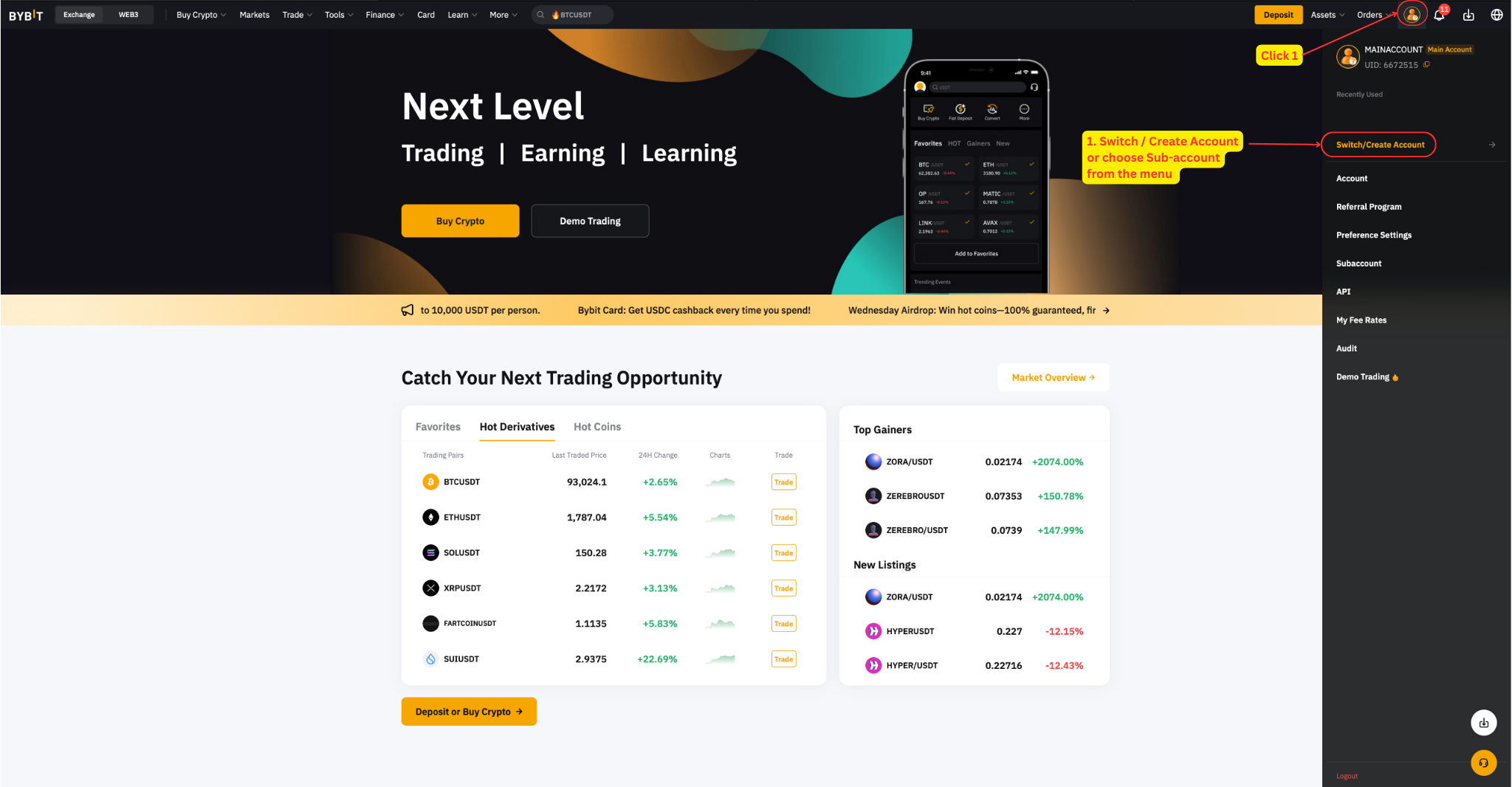
Log in to your main account, then go to Switch / Create Account or choose Sub-account from the menu.
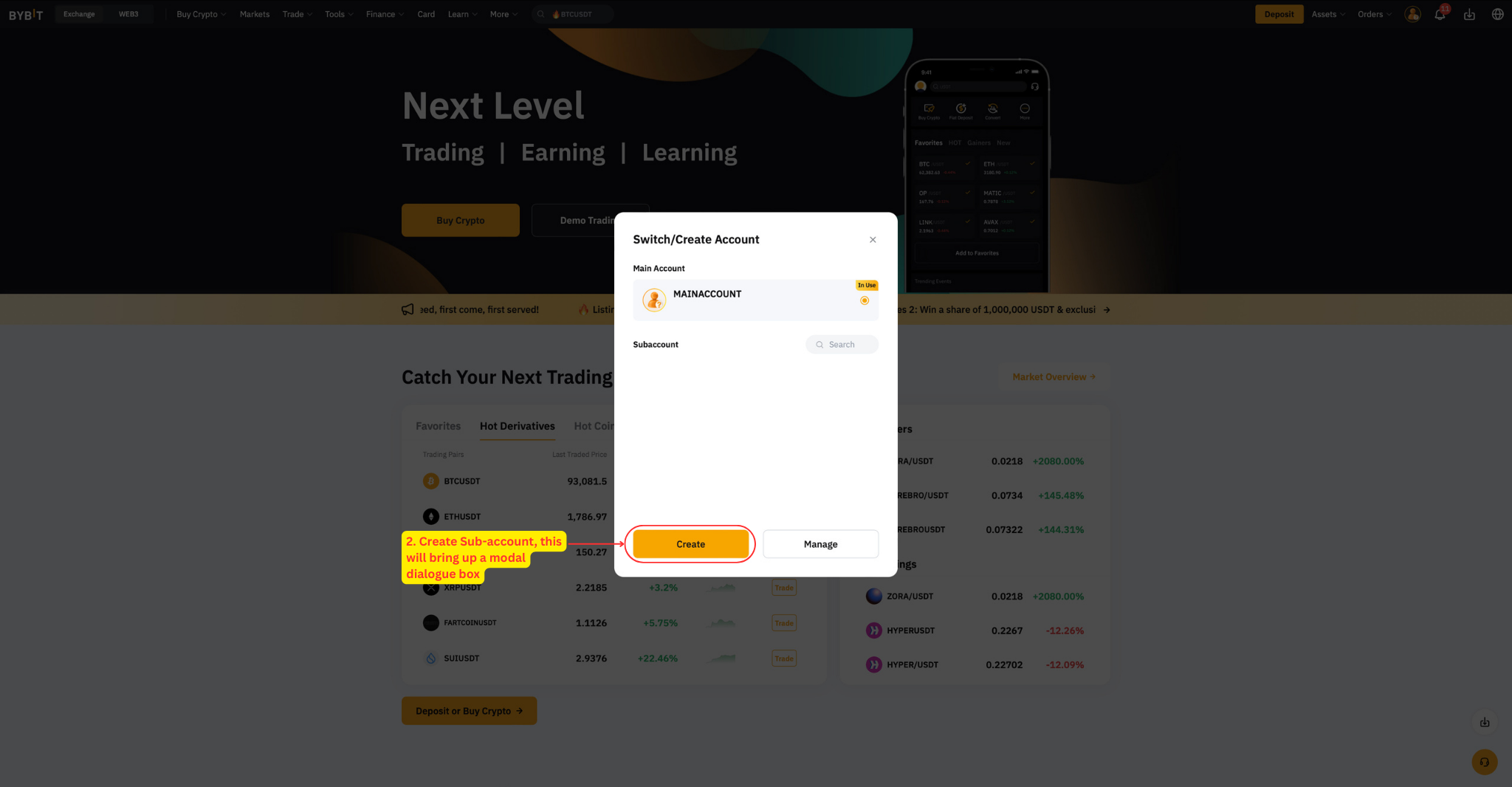
Click Create Sub-account. This will bring up a modal dialogue box.
Name your sub-account.
For account type, choose Unified Trading Account and click Confirm.
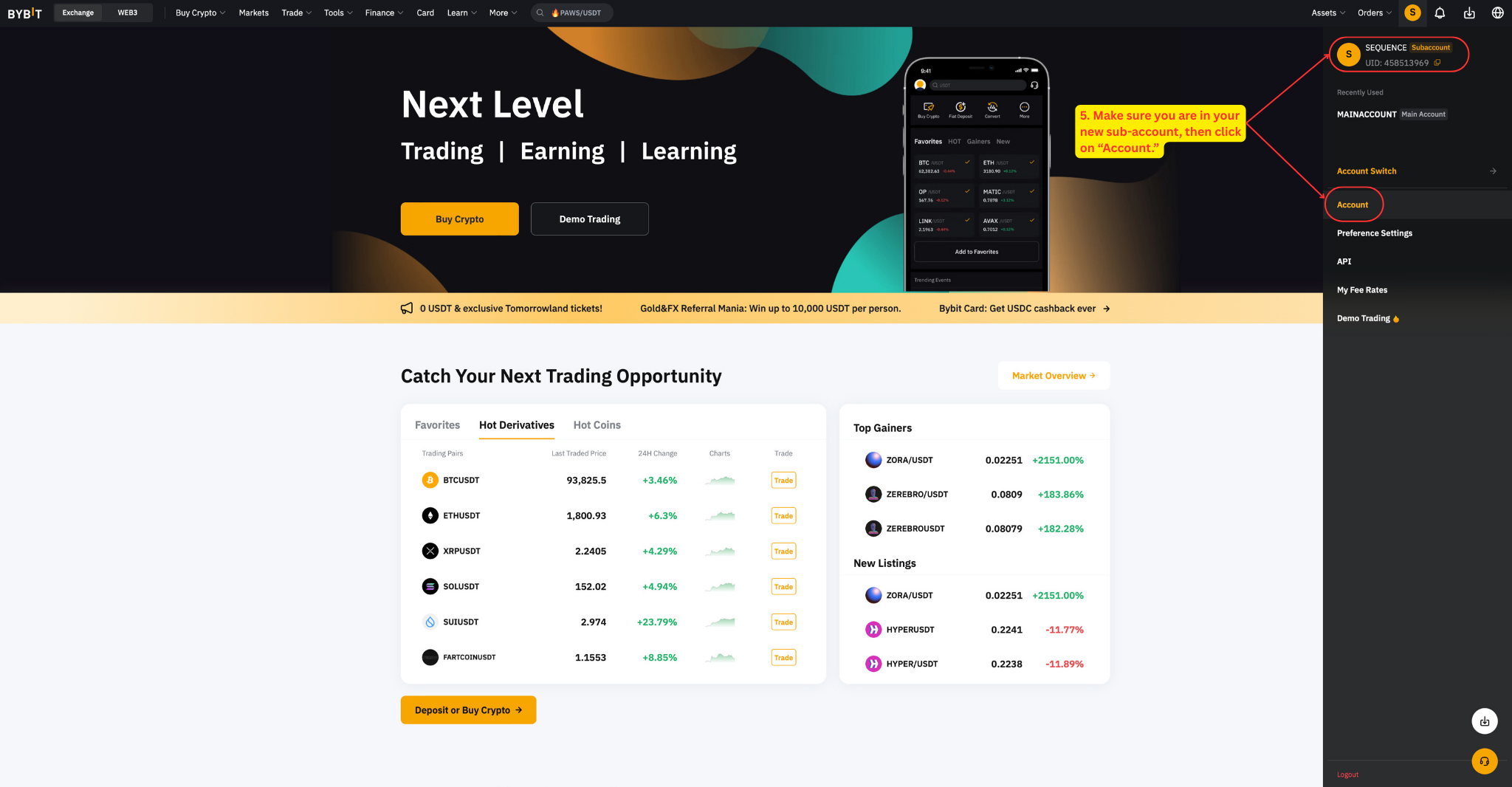
Switch to your new sub-account and click Account.
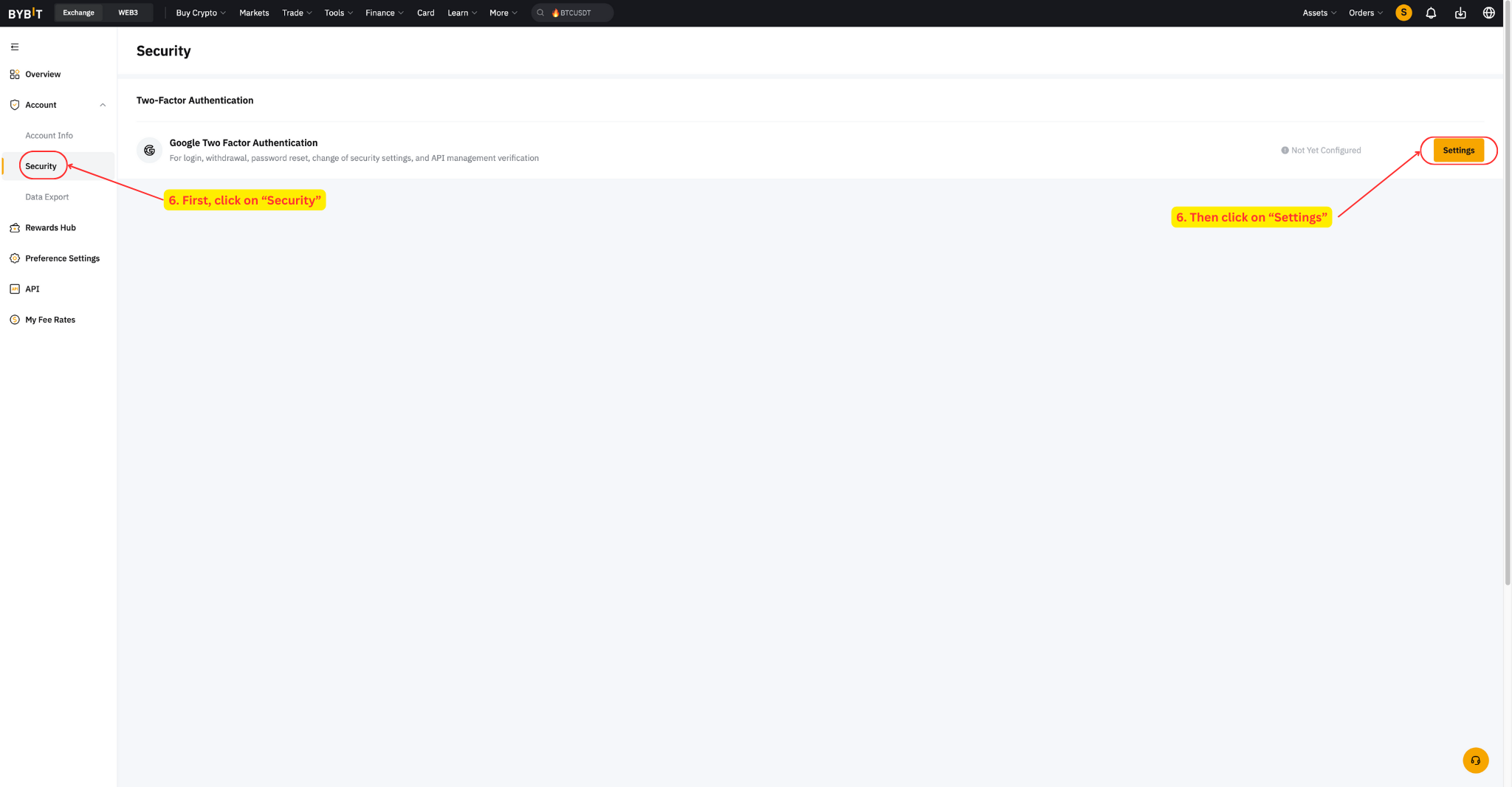
Go to Security → Settings. This will bring up a modal dialogue box.
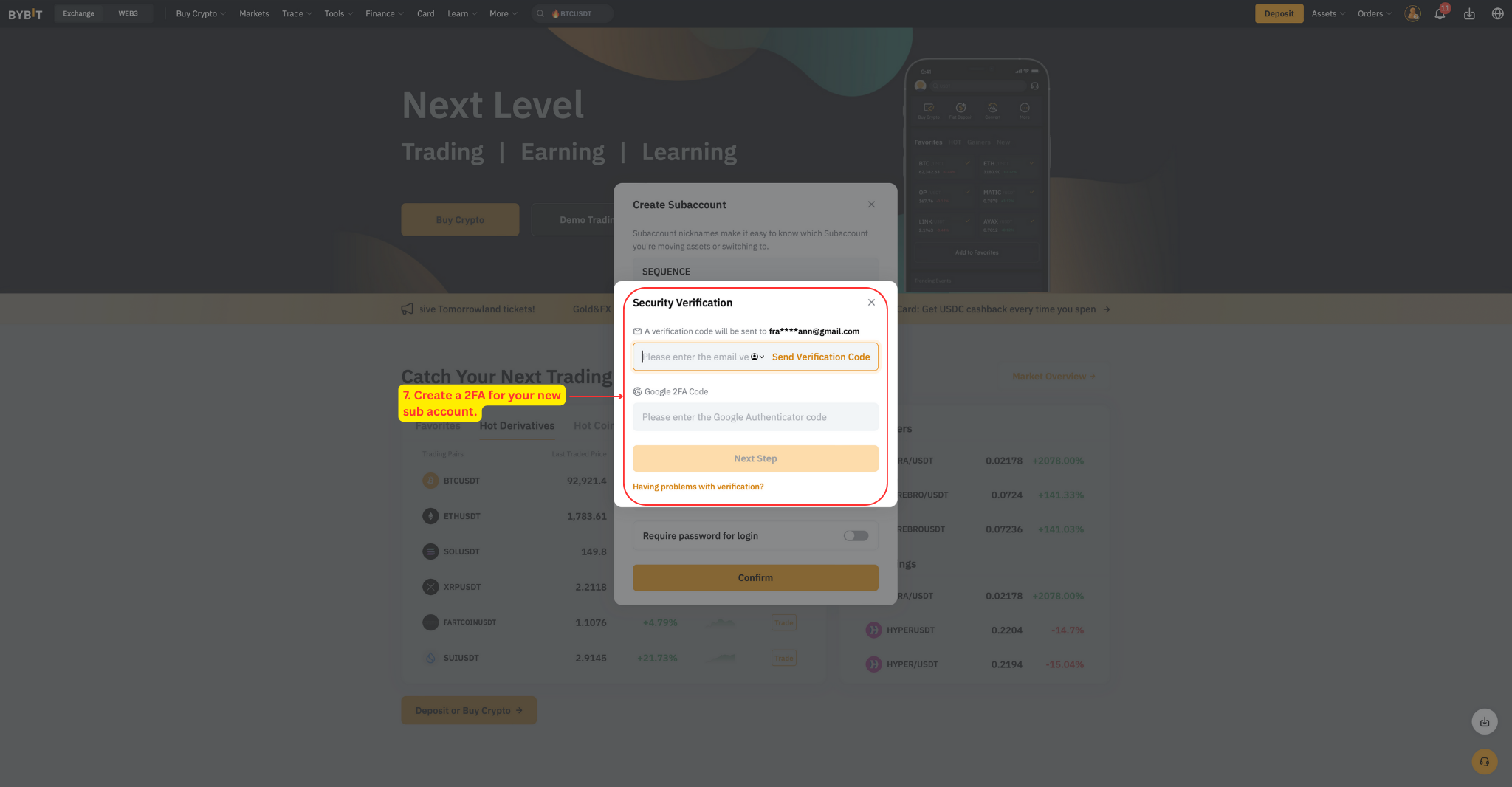
Create a 2FA for the sub-account — this is separate from your main account's 2FA. You'll receive an email with a security code, then scan the QR code with Google Authenticator.
Step 2: Transfer Funds
Next, transfer the required minimum balance (0.2 BTC) to your new sub-account. We cannot connect sub-accounts without the required funds — attempting to do so will trigger an "Insufficient Funds" error. Note that API permissions are restricted to trading only — we cannot withdraw or transfer funds under any circumstances.
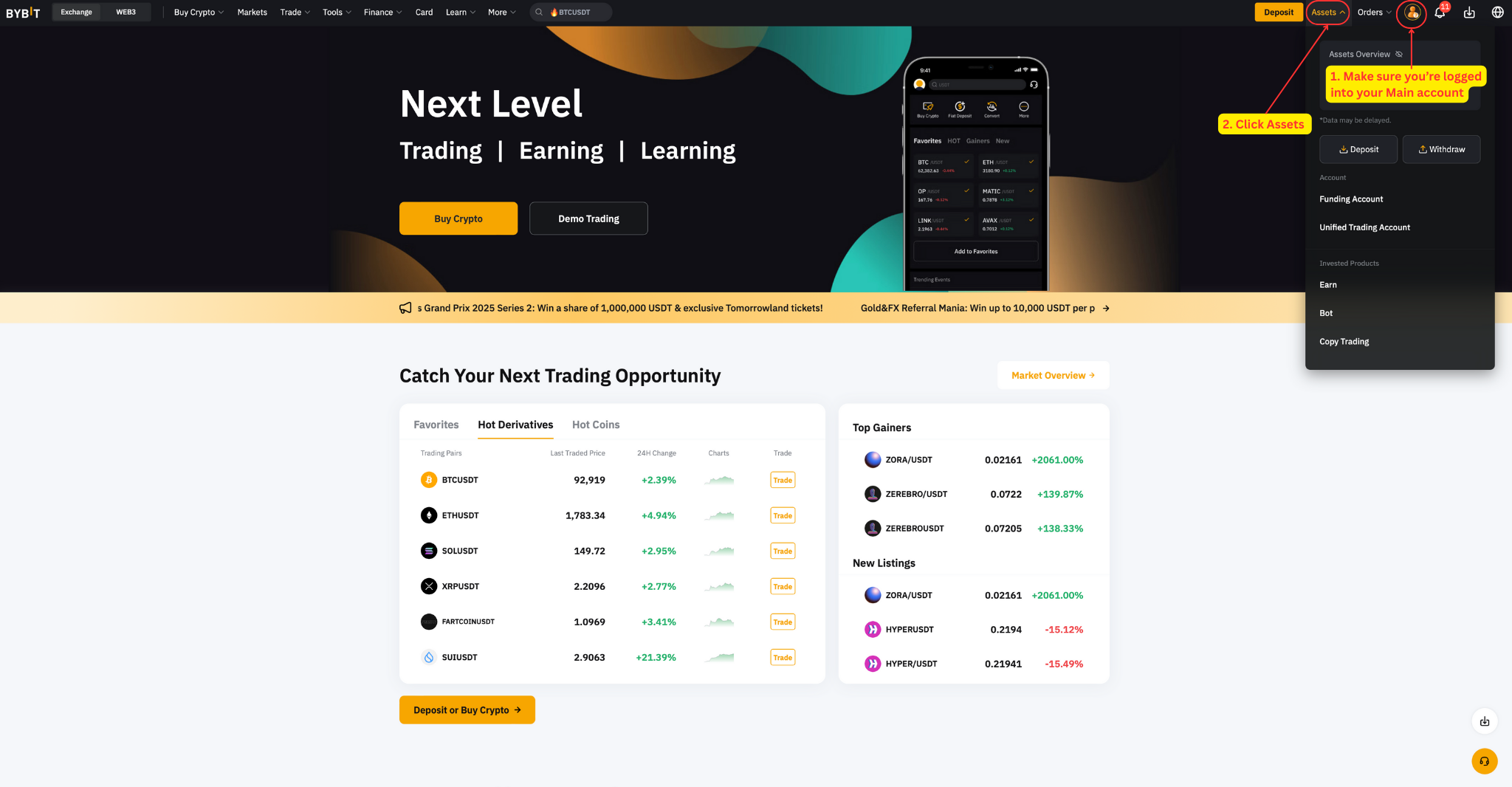
Log into your main account.
In the top bar, click Assets.
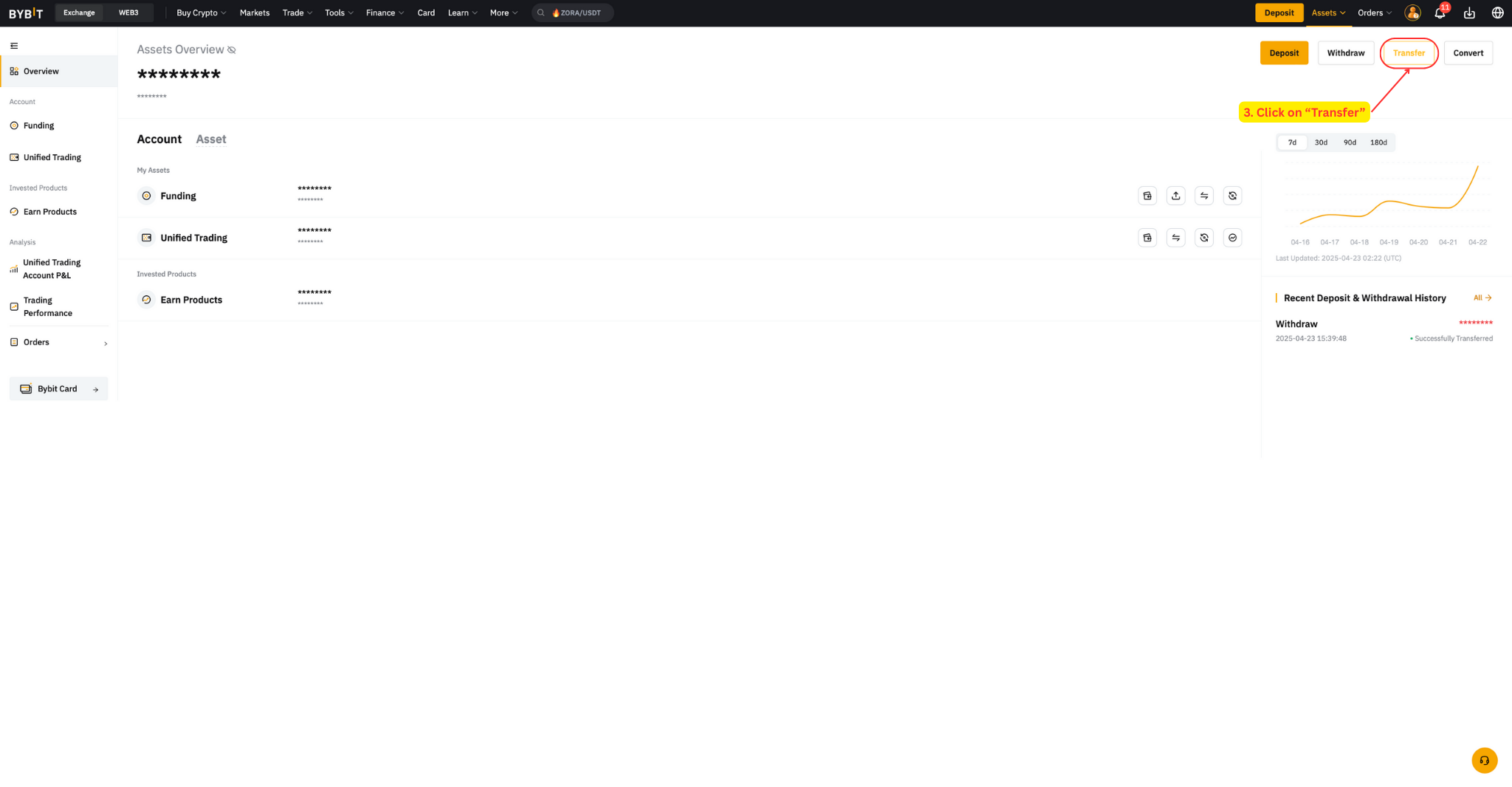
Click Transfer. This will bring up a modal dialogue box.
Select Across sub-account(s).
Transfer from: Main account "Funding / Unified trading" → Your new sub-account "Unified Trading".
Input amount (minimum 0.2 BTC) in your base trading asset.
Click Confirm.
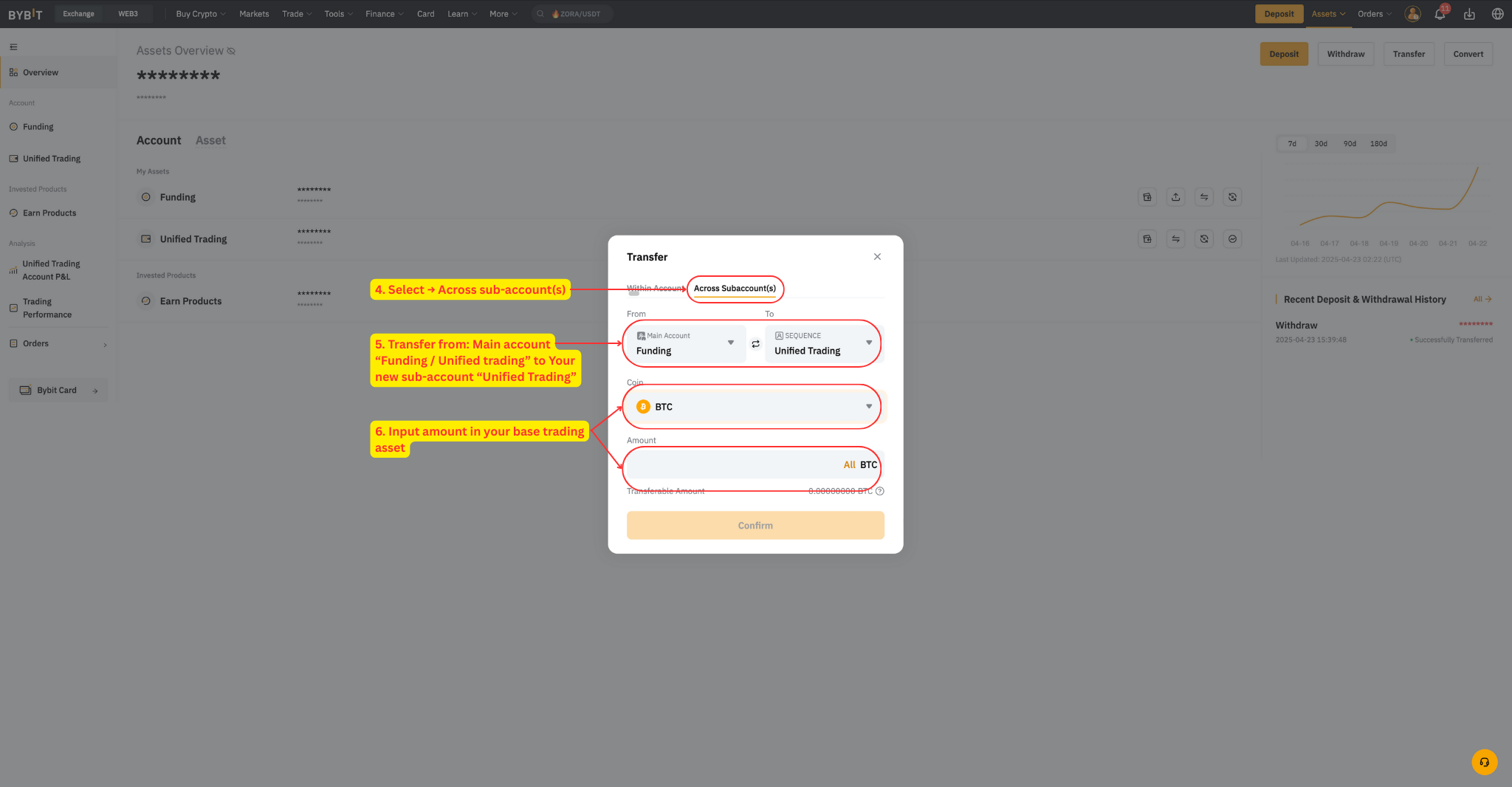
Important: Make sure funds go to the sub-account's Unified Trading wallet — this is the designated wallet for all Sequence trading operations.
Step 3: Enable Cross Margin
Cross Margin must be enabled before you submit your API keys — do not change this setting after submission. If this configuration is not set properly, our system will be unable to activate your strategy and you'll need to start the setup process again.
Navigate to bybit.com/user/assets/home/tradingaccount.
Check that Cross Margin is enabled.
If you see "Isolated Margin" instead, click on it to open the setup popup.
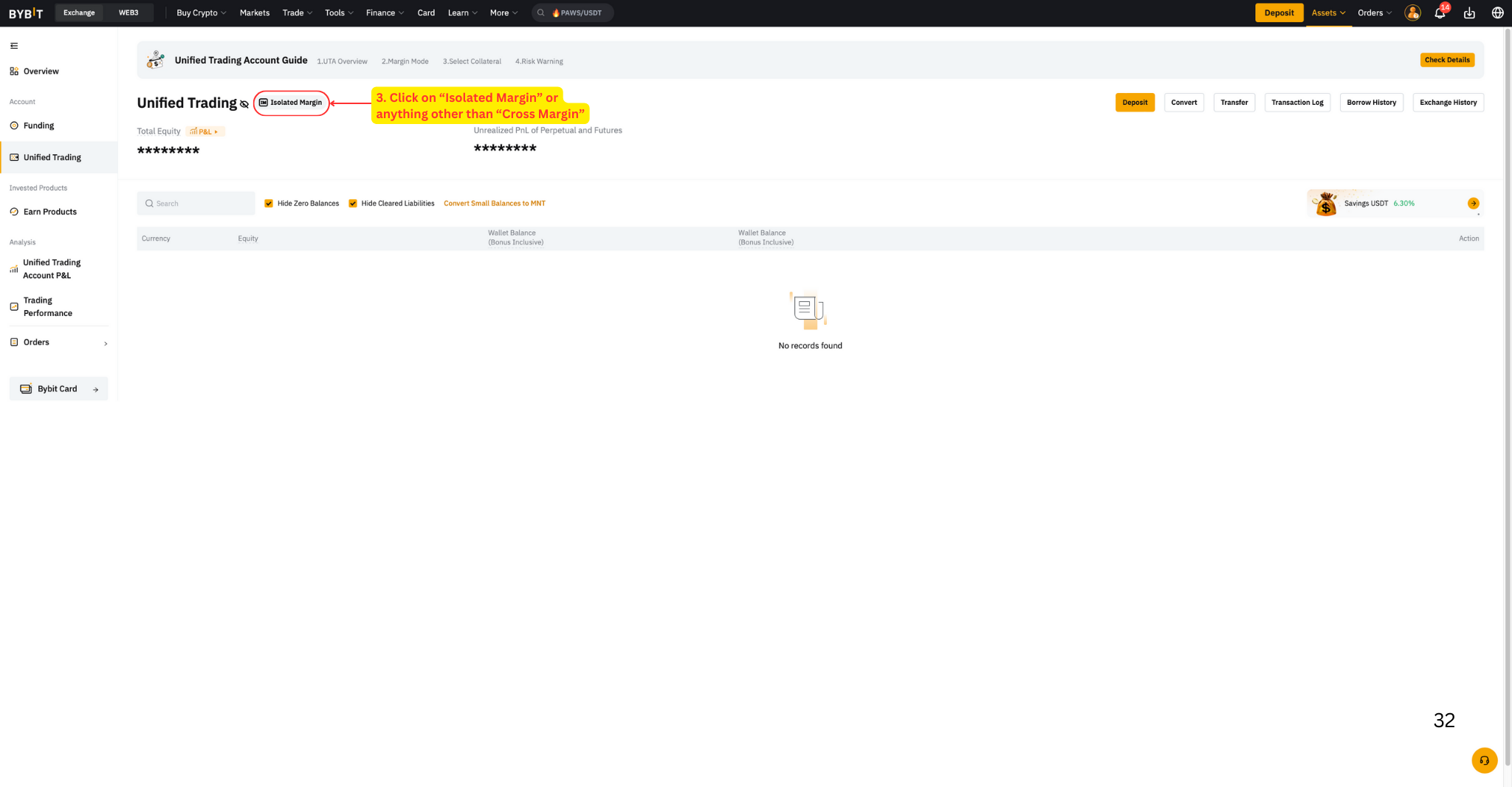
In the popup, find the Cross Margin column and click Settings.
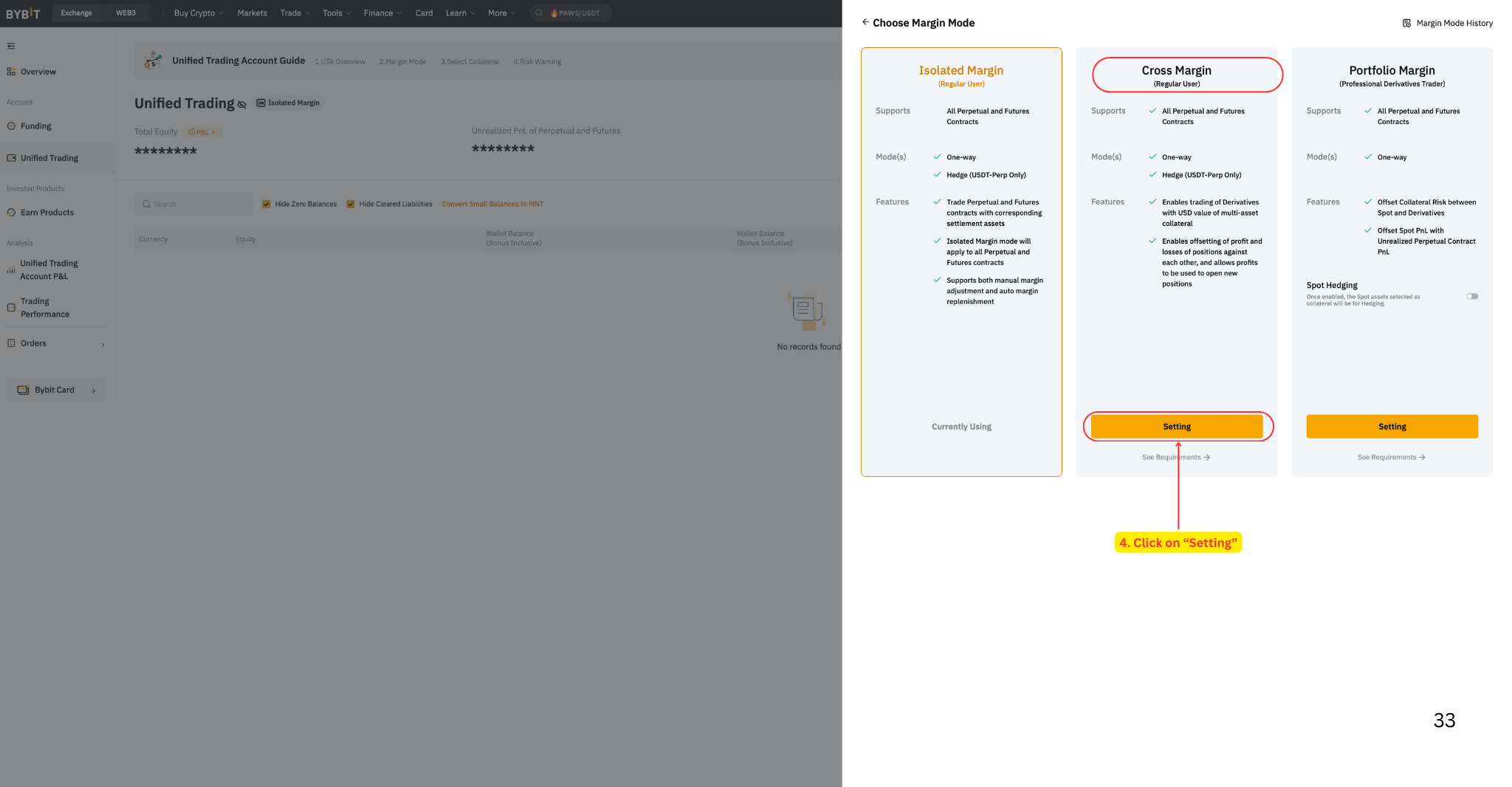
Verify Cross Margin is enabled, then click Check Details.
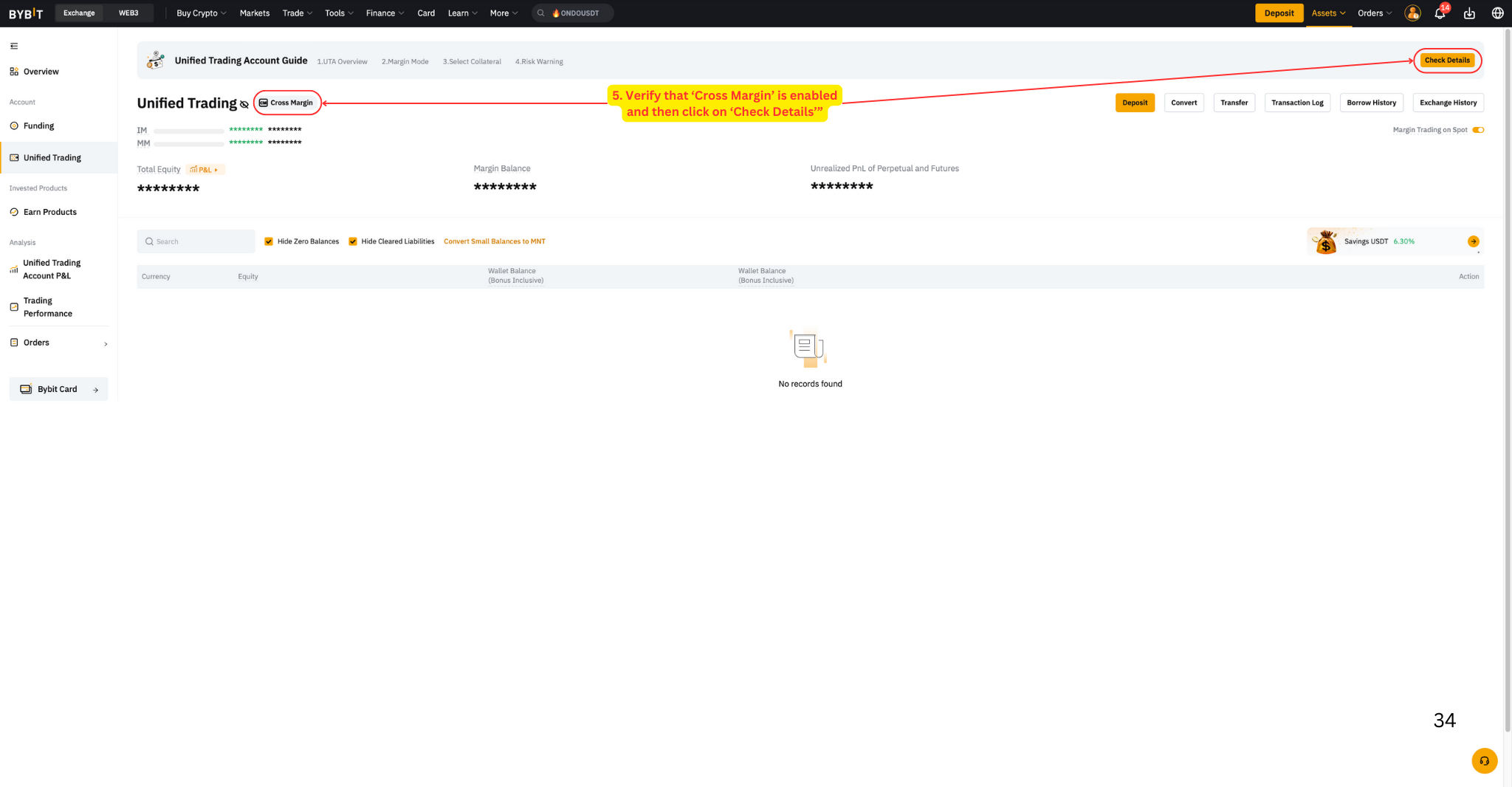
Navigate through the Unified Trading Guide by clicking Next Page until you reach Complete (4 clicks total).
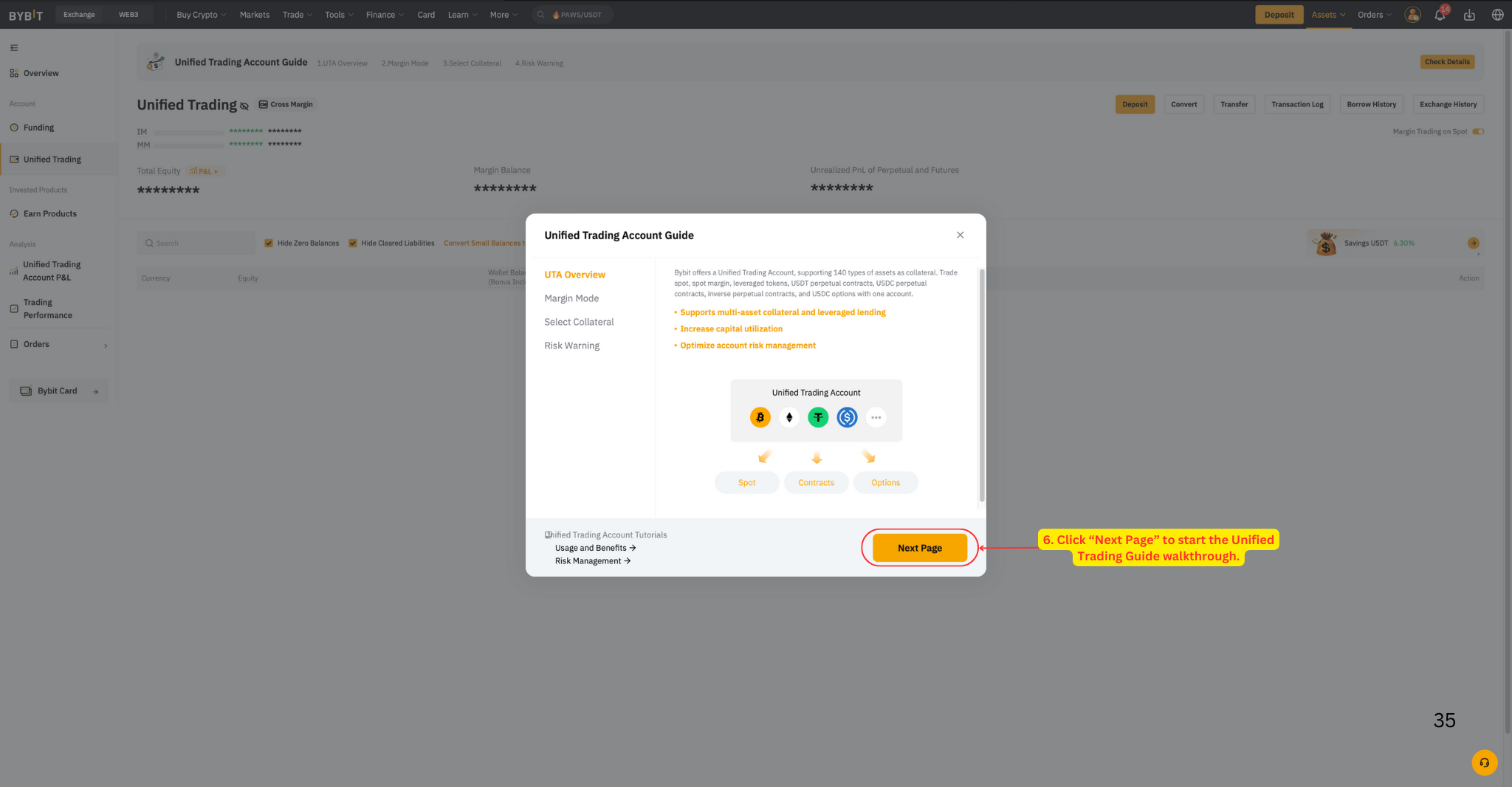
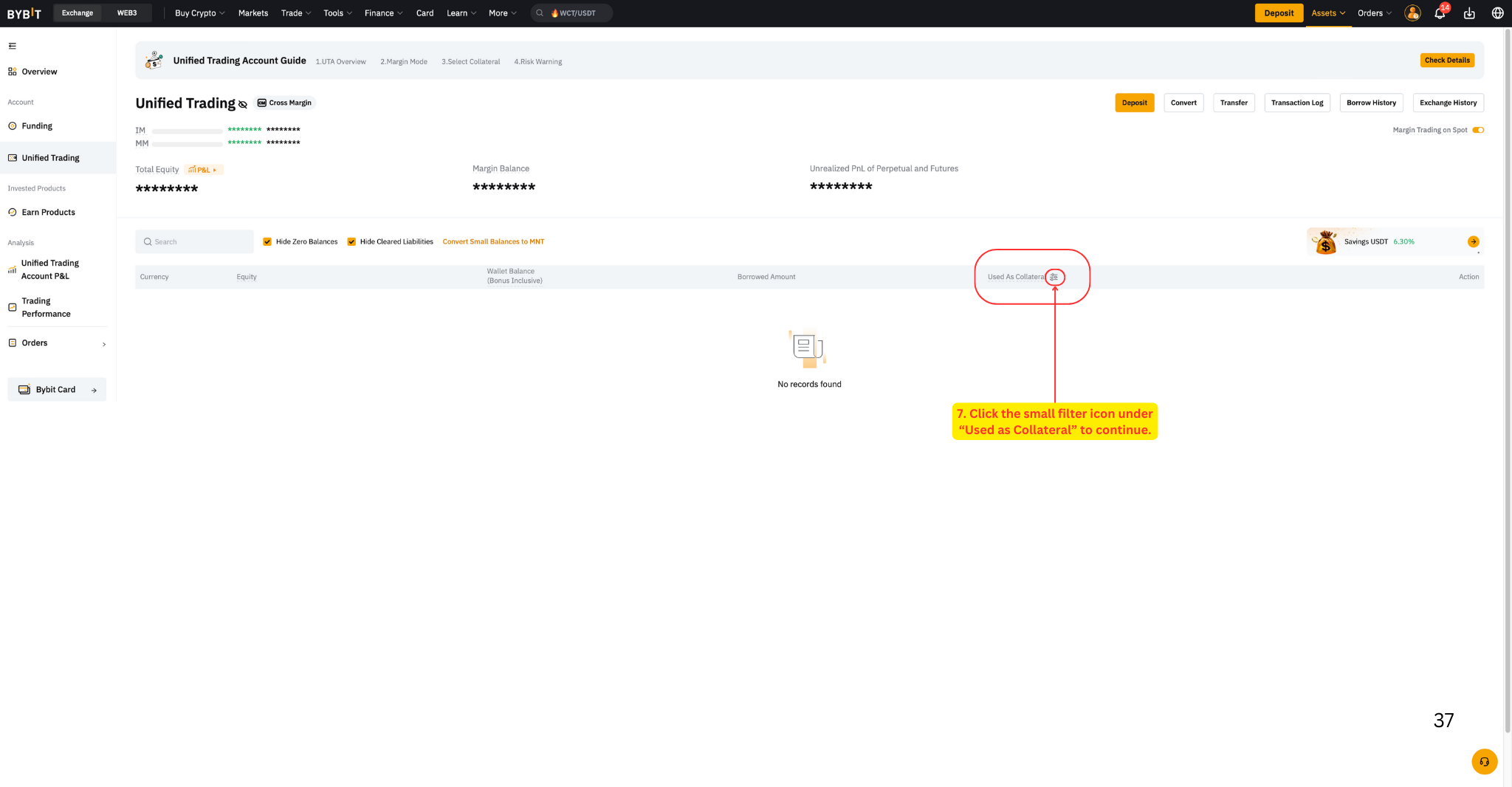
On the Unified Trading dashboard, click the filter icon under the Used as column.
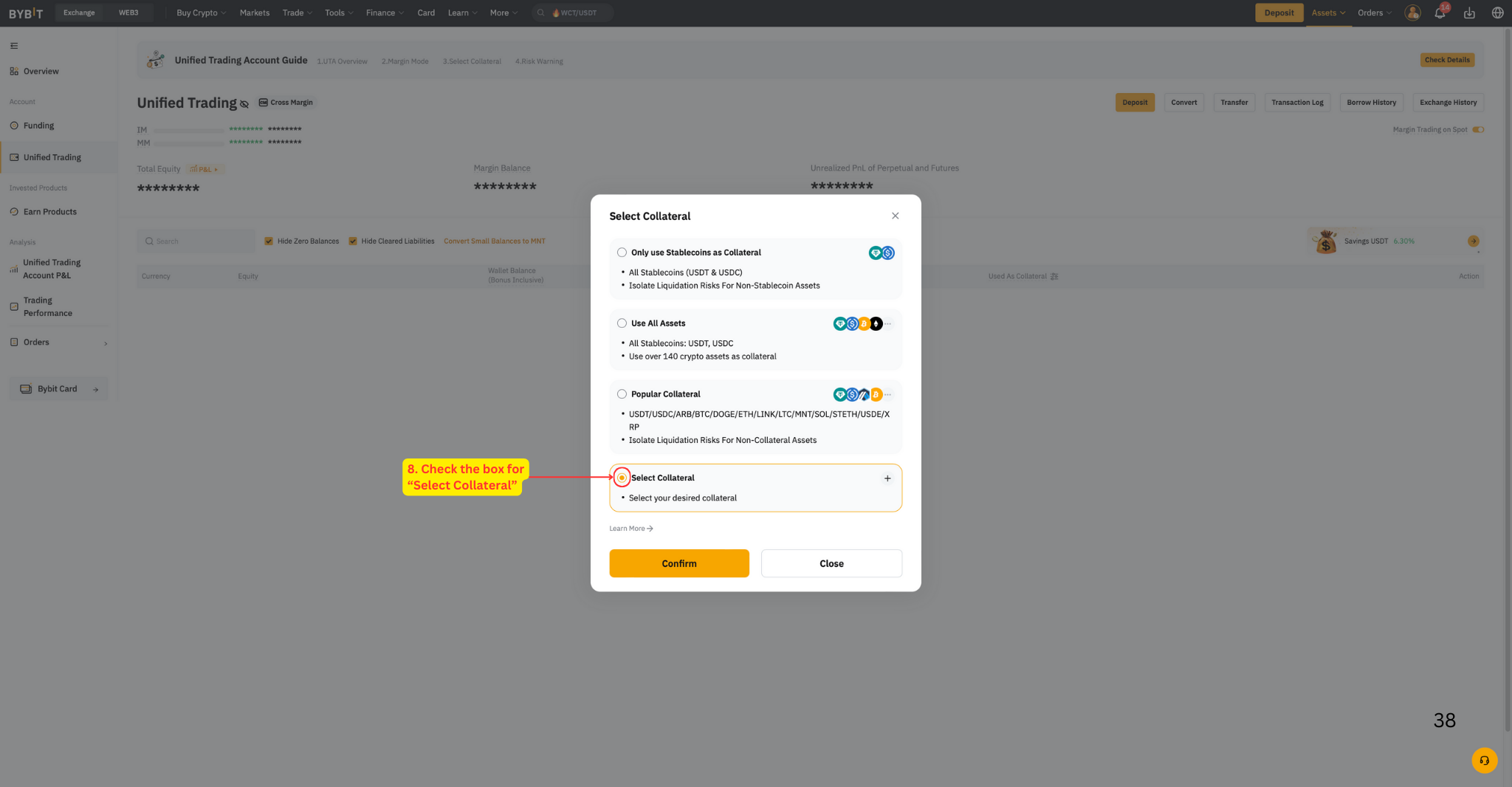
In the popup, choose Select Collateral.
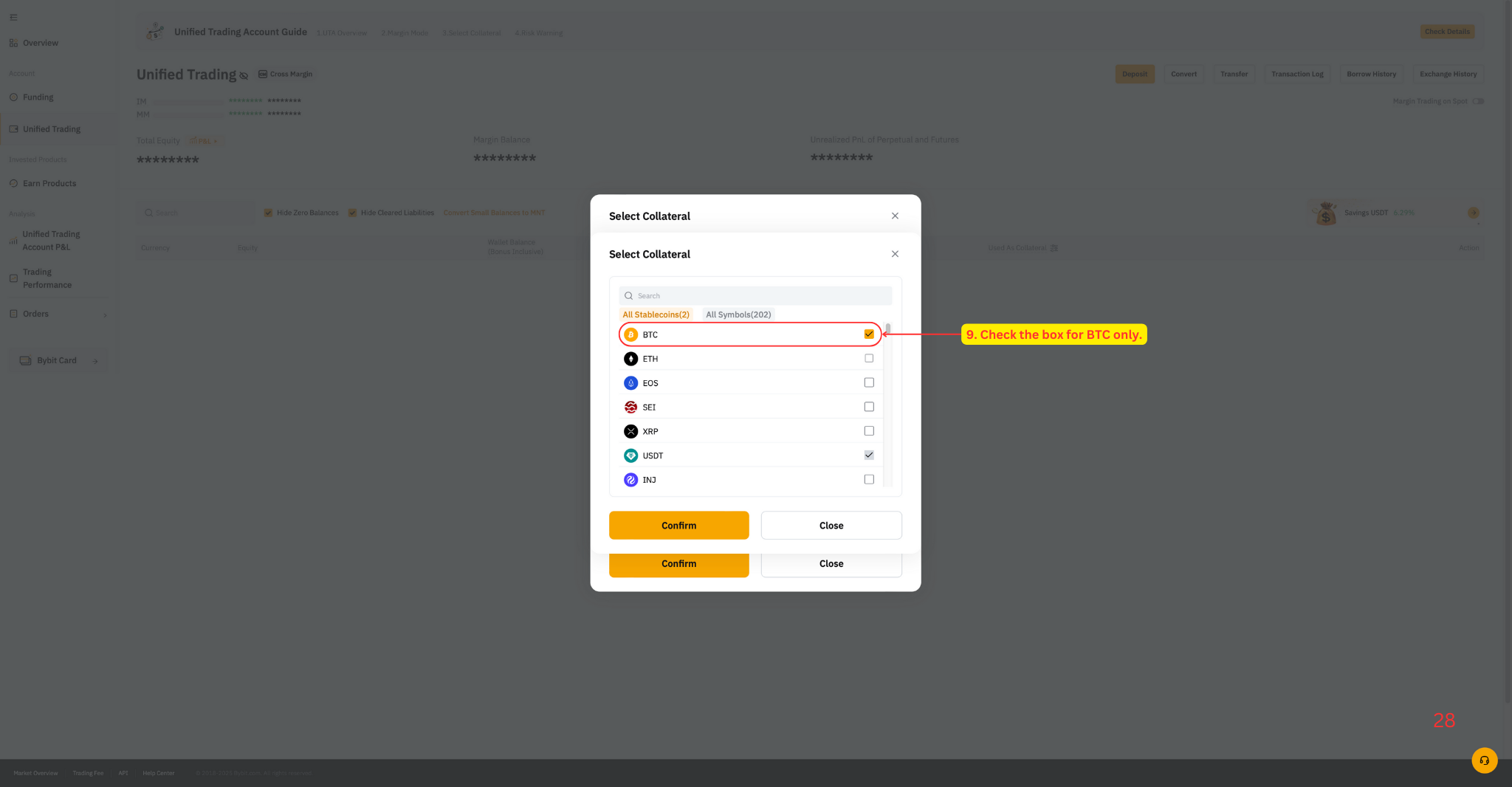
Check the box for BTC only and confirm.
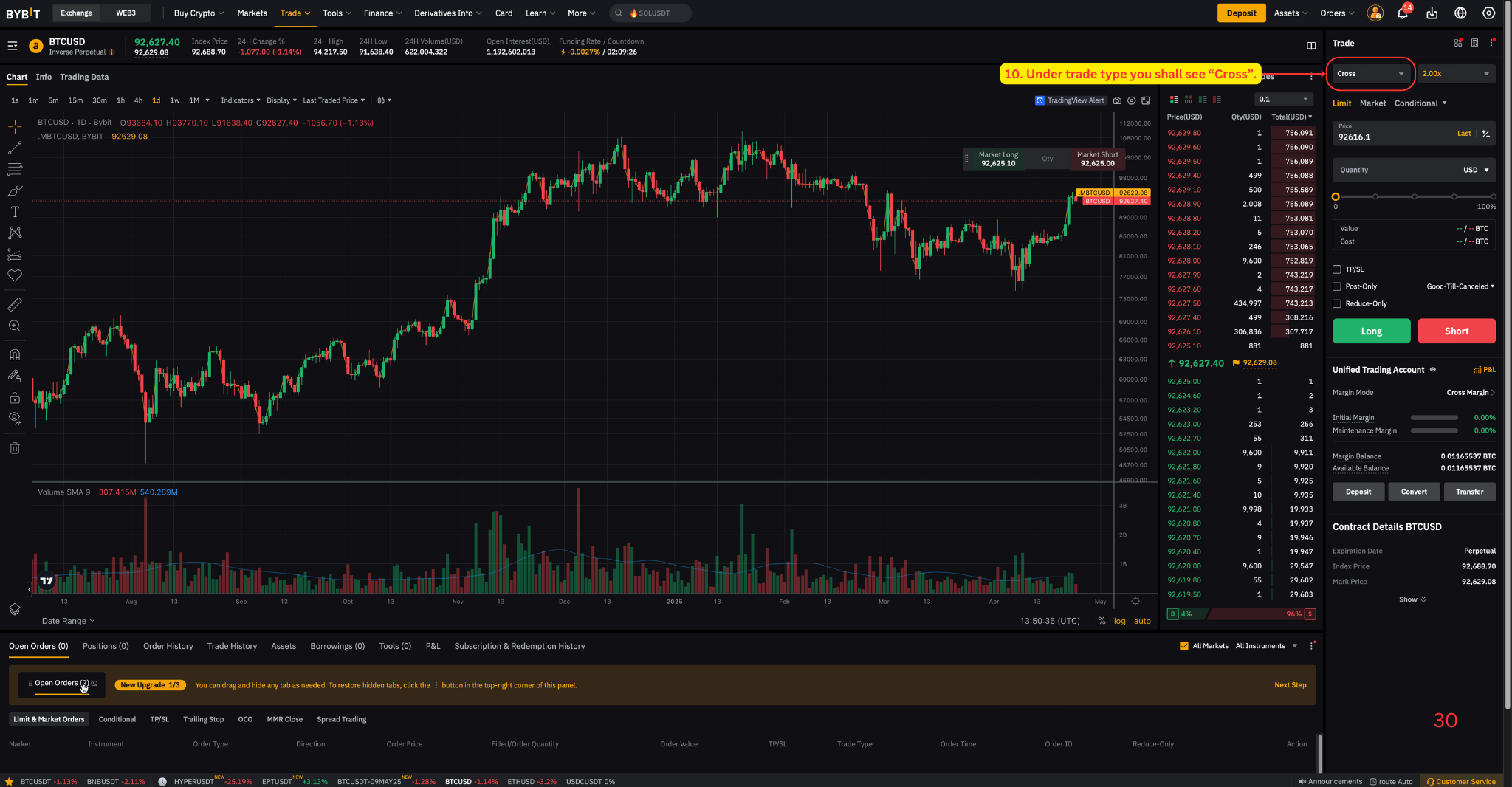
Verify at bybit.com/trade/inverse/BTCUSD — under trade type you should see Cross.
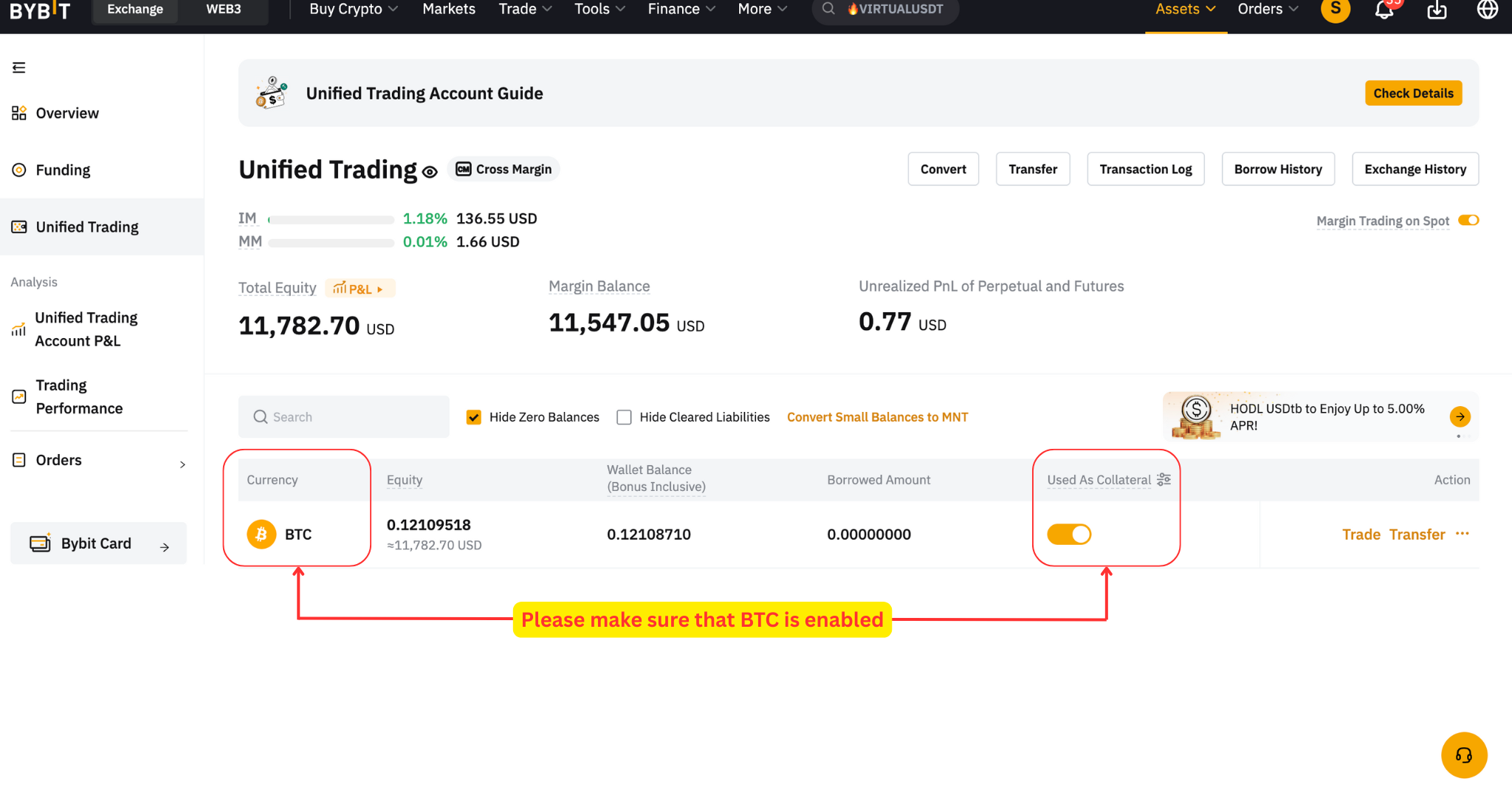
Step 4: Ensure Correct Collateral
Now make sure your sub-account has the correct collateral enabled. It is extremely important that only BTC is chosen as the available collateral — you must never use alternative coins as collateral. We need access to the BTC deposited in your UTA wallet to execute trades.
In your UTA sub-account, navigate to bybit.com/user/assets/home/tradingaccount.
For BTC (BTC accumulation), confirm that BTC is enabled as collateral.
Your assets should be automatically moved to the UTA wallet.
Step 5: Create API Keys
Now it's time to create your API keys. If you're setting up a new strategy, make sure you've completed all previous steps first. If you're only refreshing existing API keys, you can skip directly to this step.
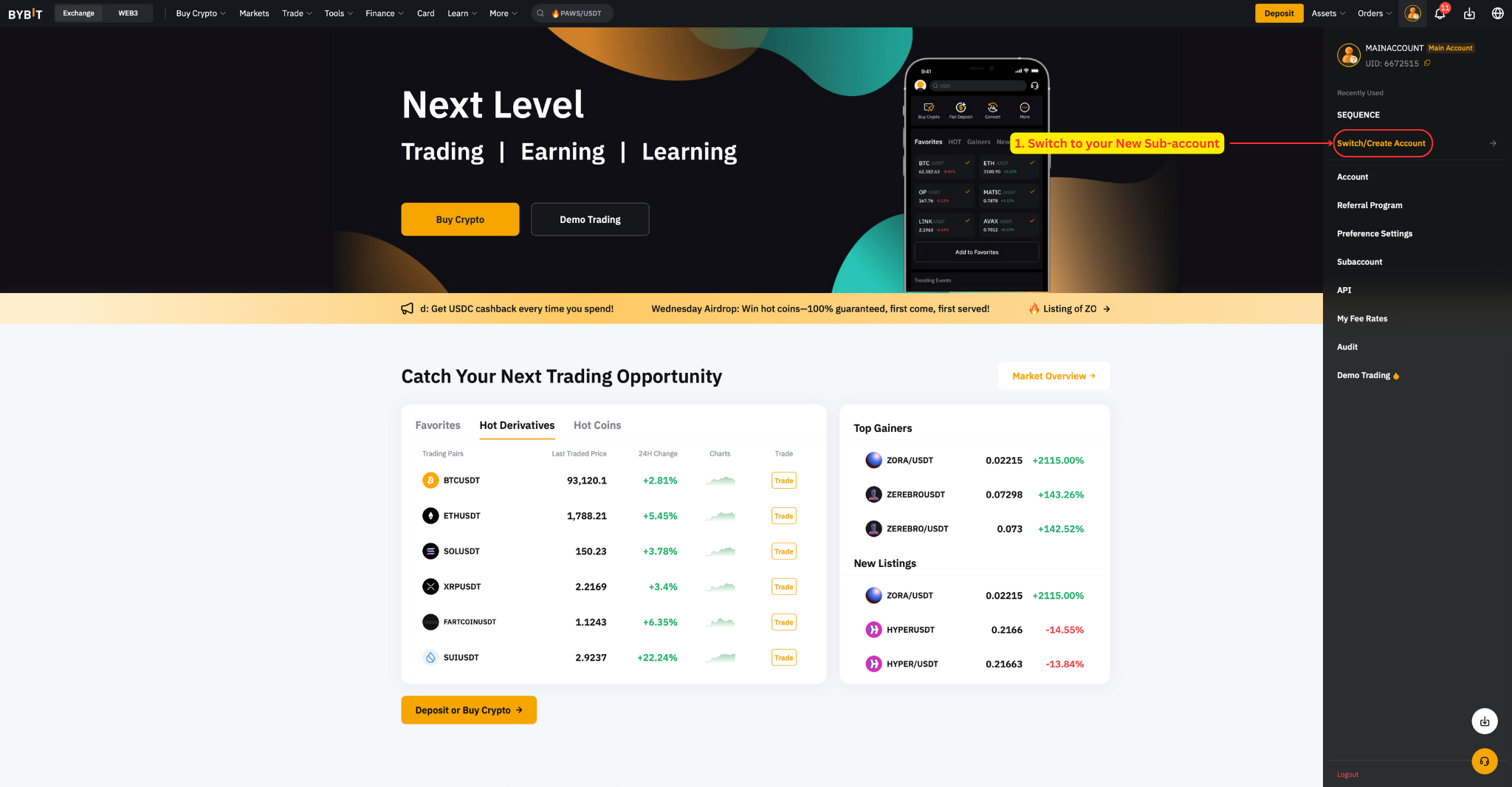
Switch to your new sub-account.
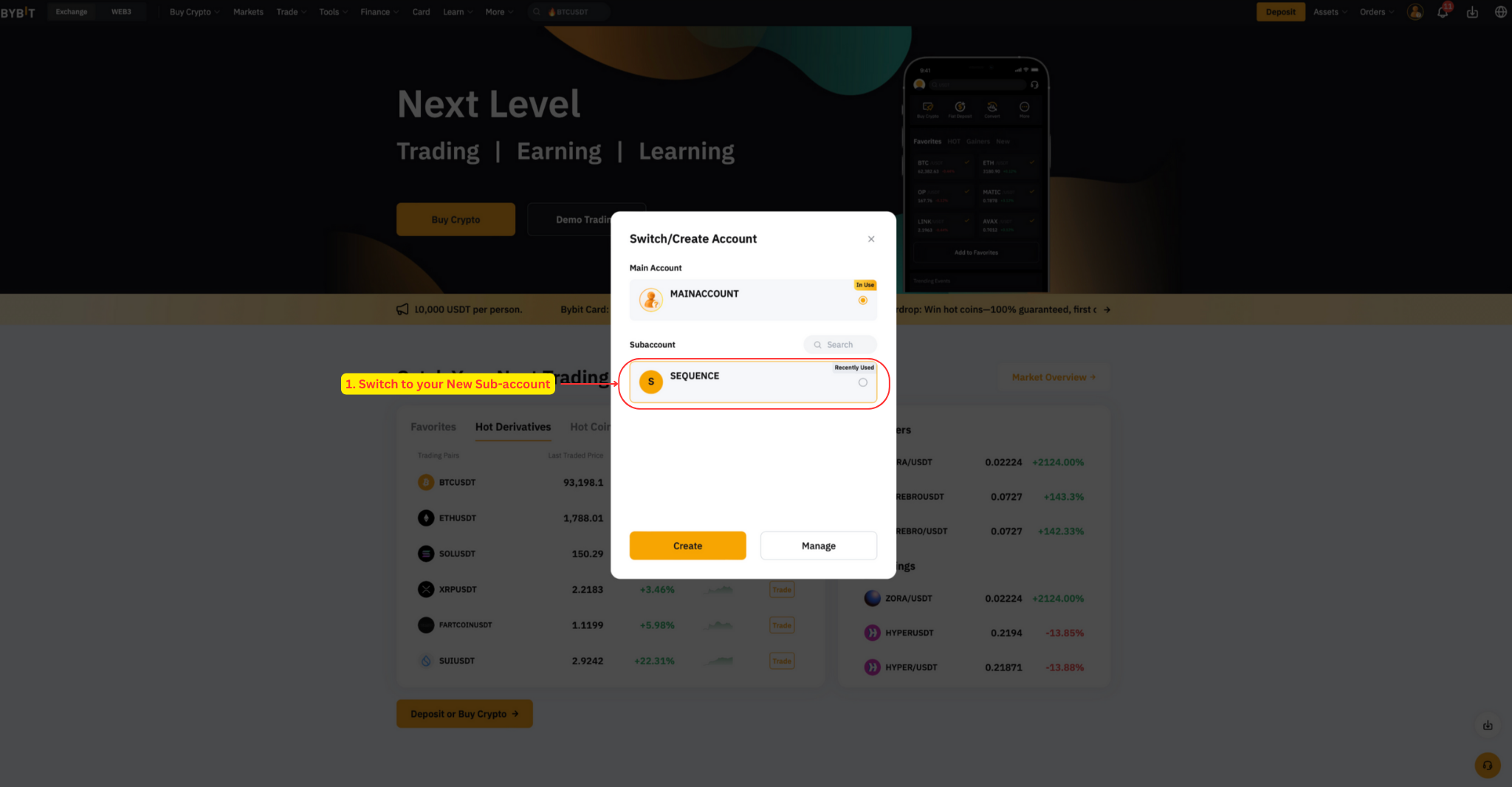
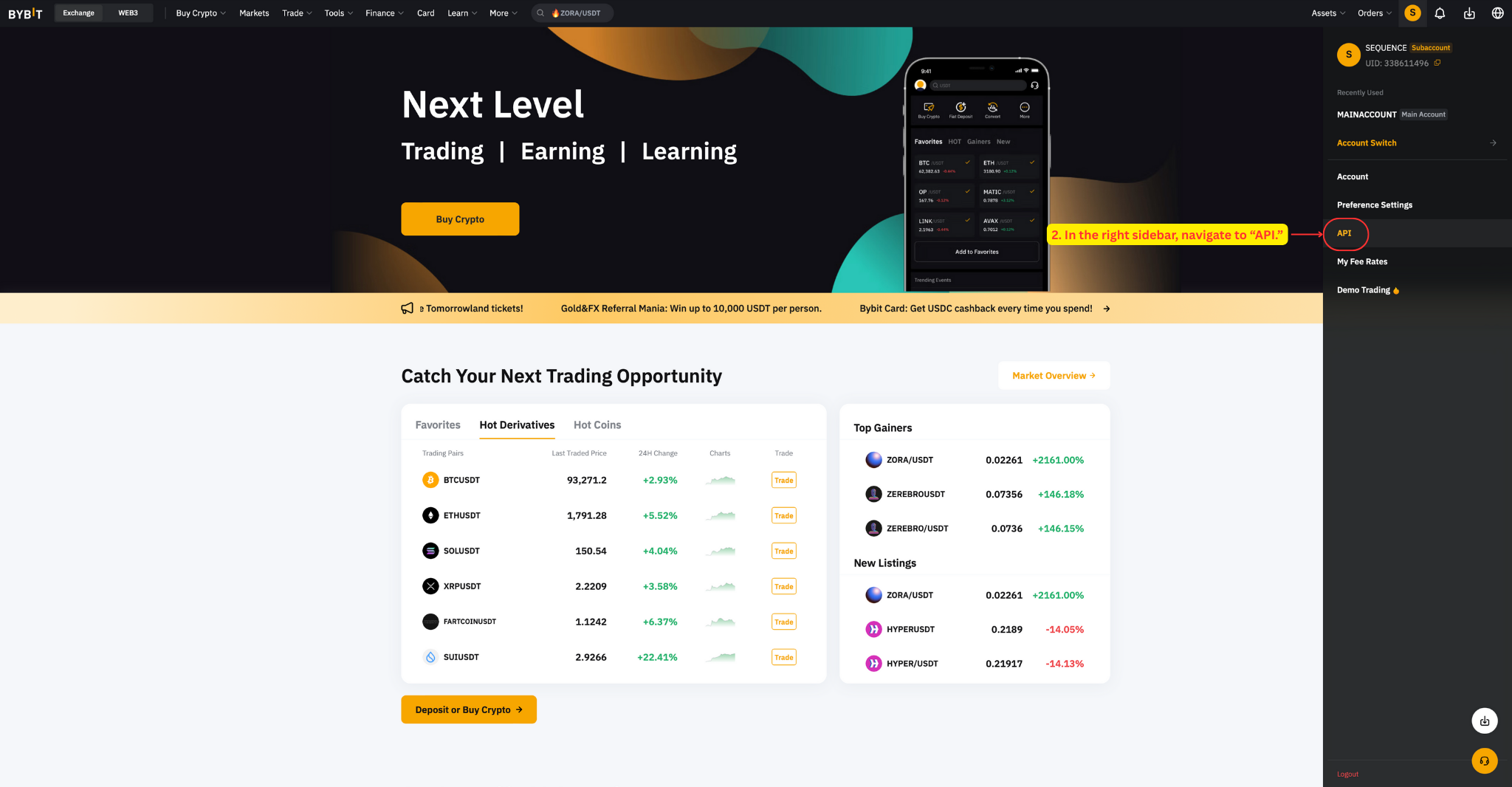
In the sidebar, navigate to API.
Click Create New Key.
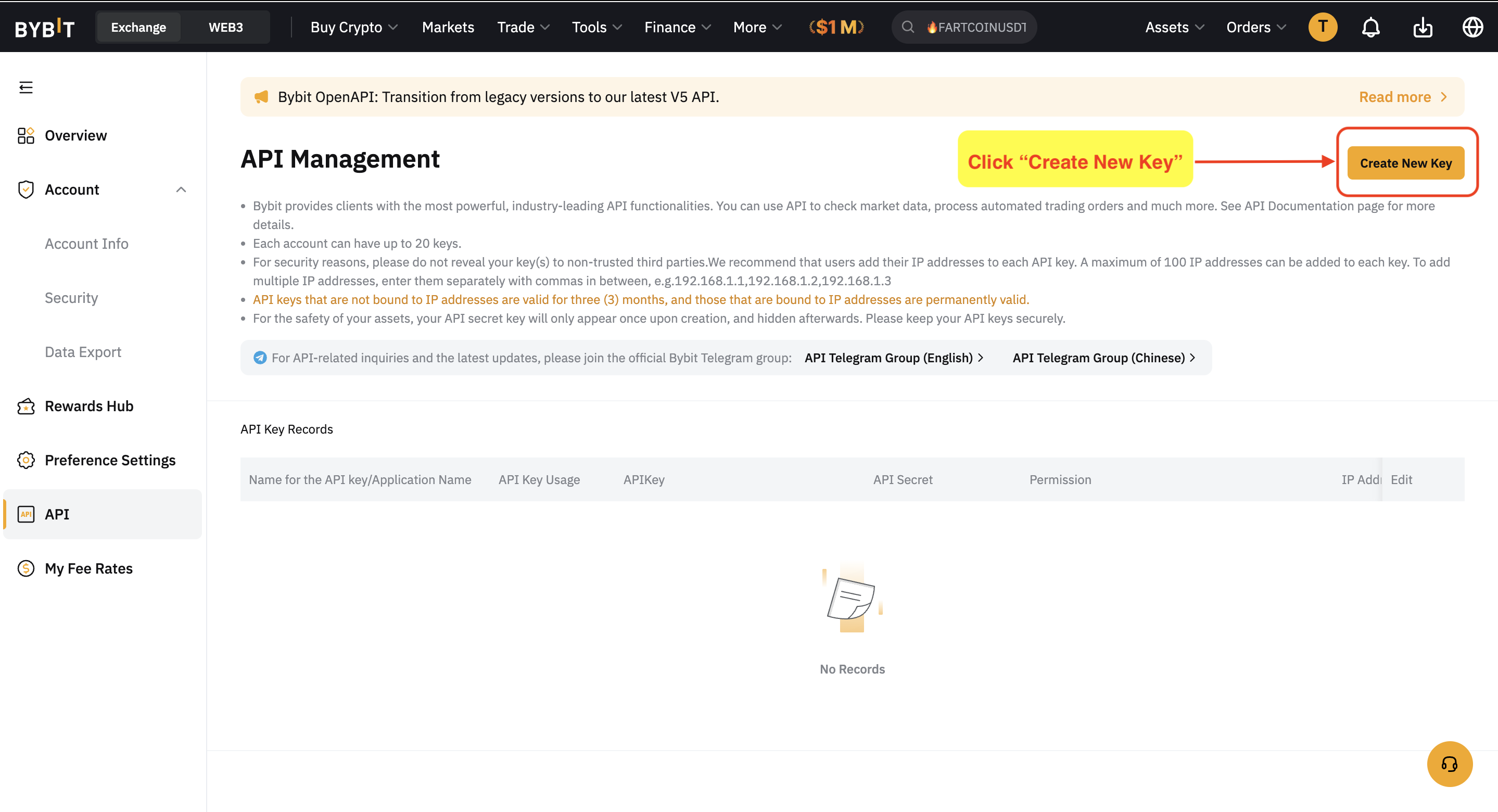
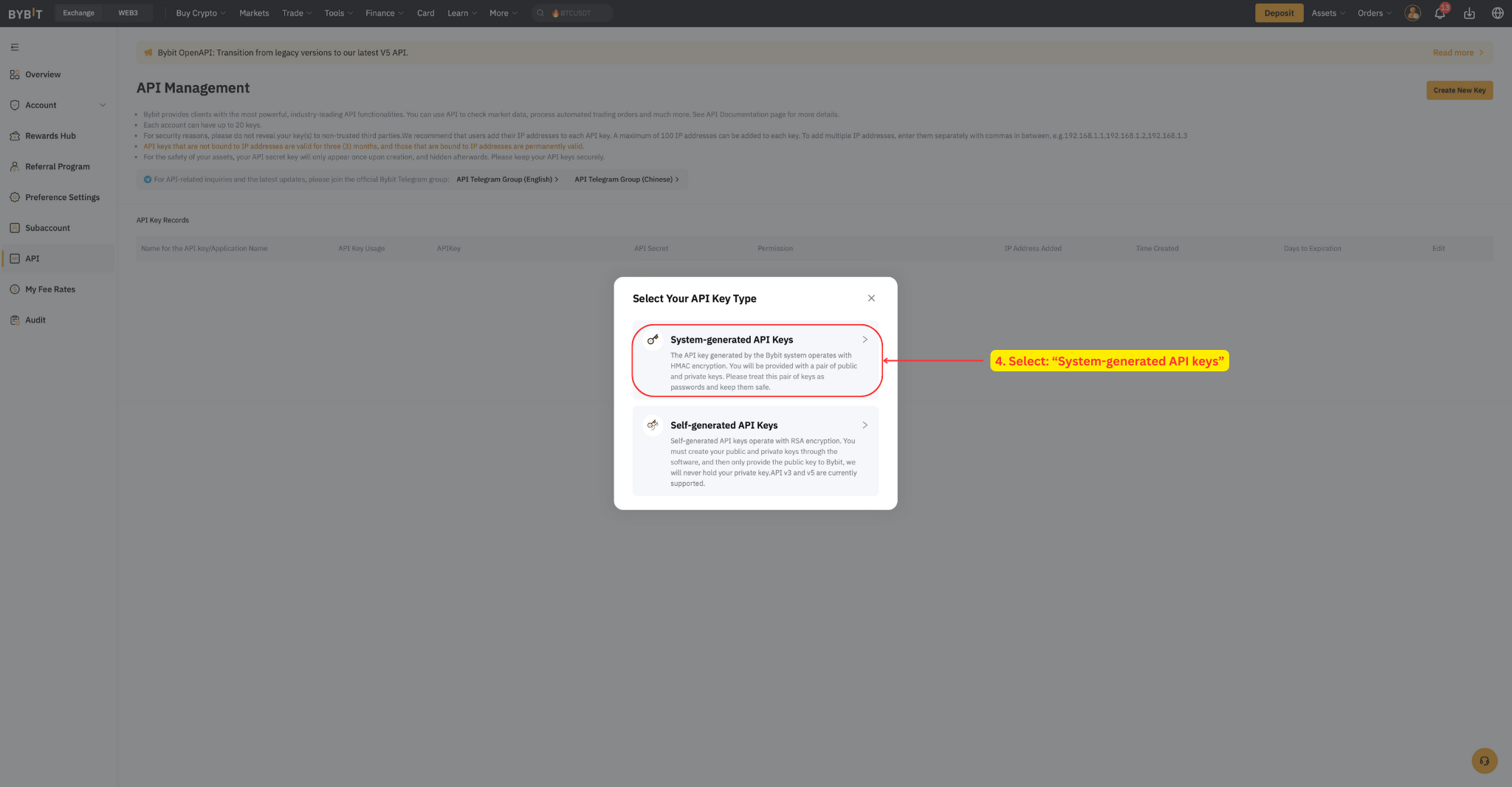
Select System-generated API keys.
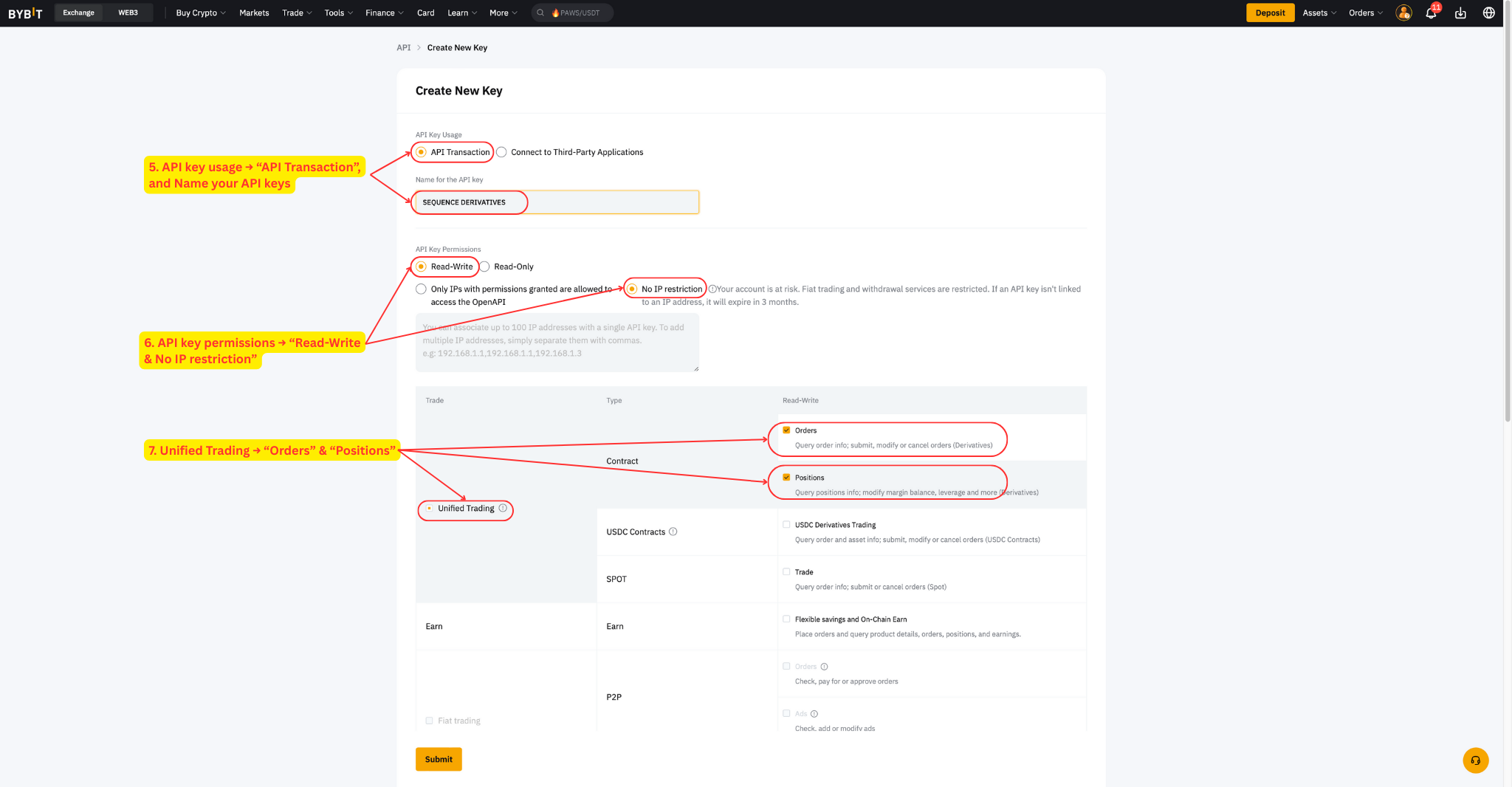
Set API key usage to API Transaction and name your keys.
Set API key permissions to Read-Write and No IP restriction.
Click Unified Trading and select all permissions: Orders and Positions.
Click Submit and enter your 2FA details.
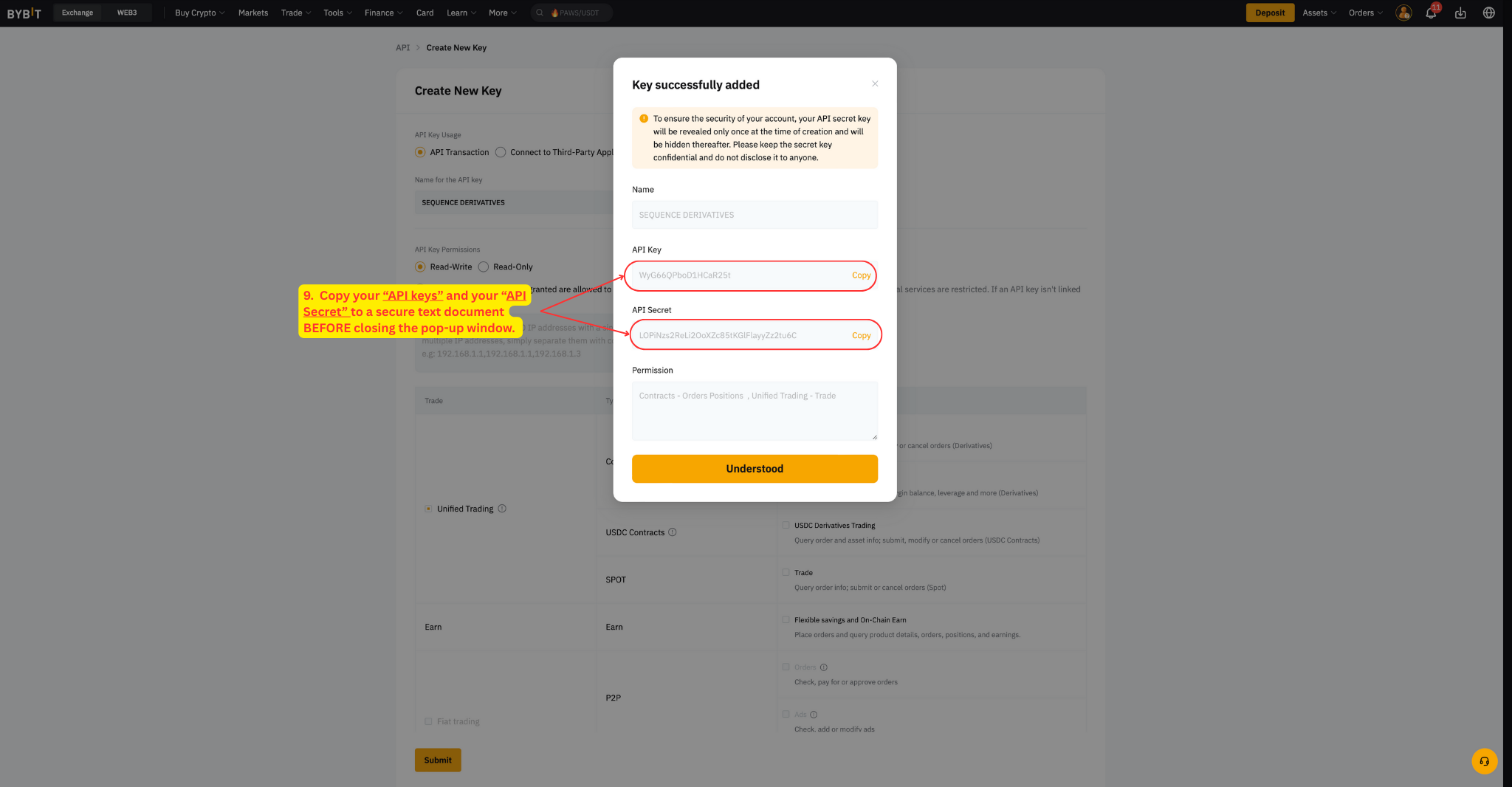
Copy your API key and API Secret to a secure location before closing the popup.
Once you have copied your keys and clicked understood, you should then see a screen like this:
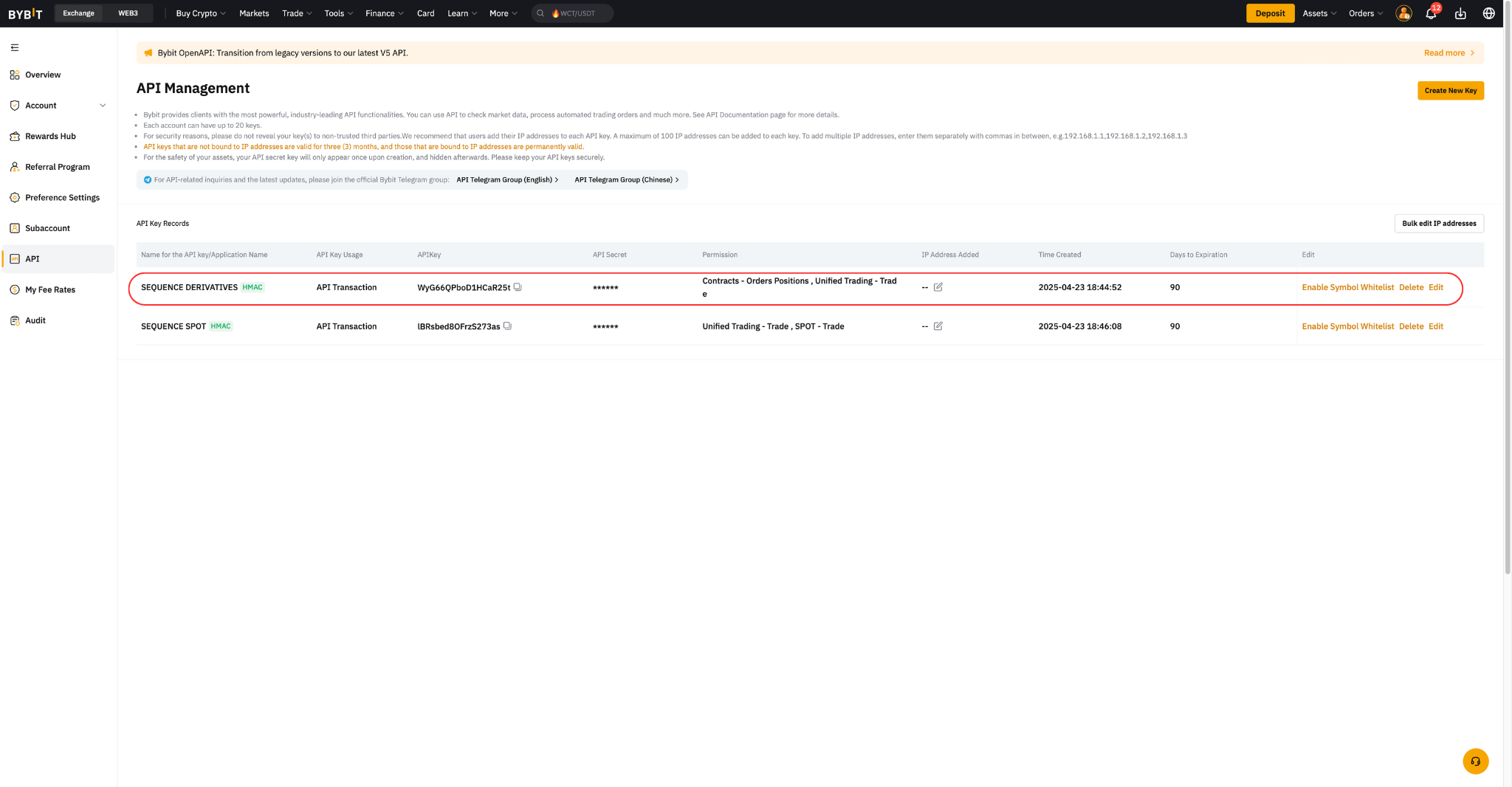
Note: Make sure to copy and save your API Secret now — it will not be shown again. Neither Bybit nor Sequence can retrieve it for you later.
Step 6: Whitelist Assets
Whitelisting restricts your API to only the specific you intend to use. This is an important security measure that protects your account from unauthorized trading activity.
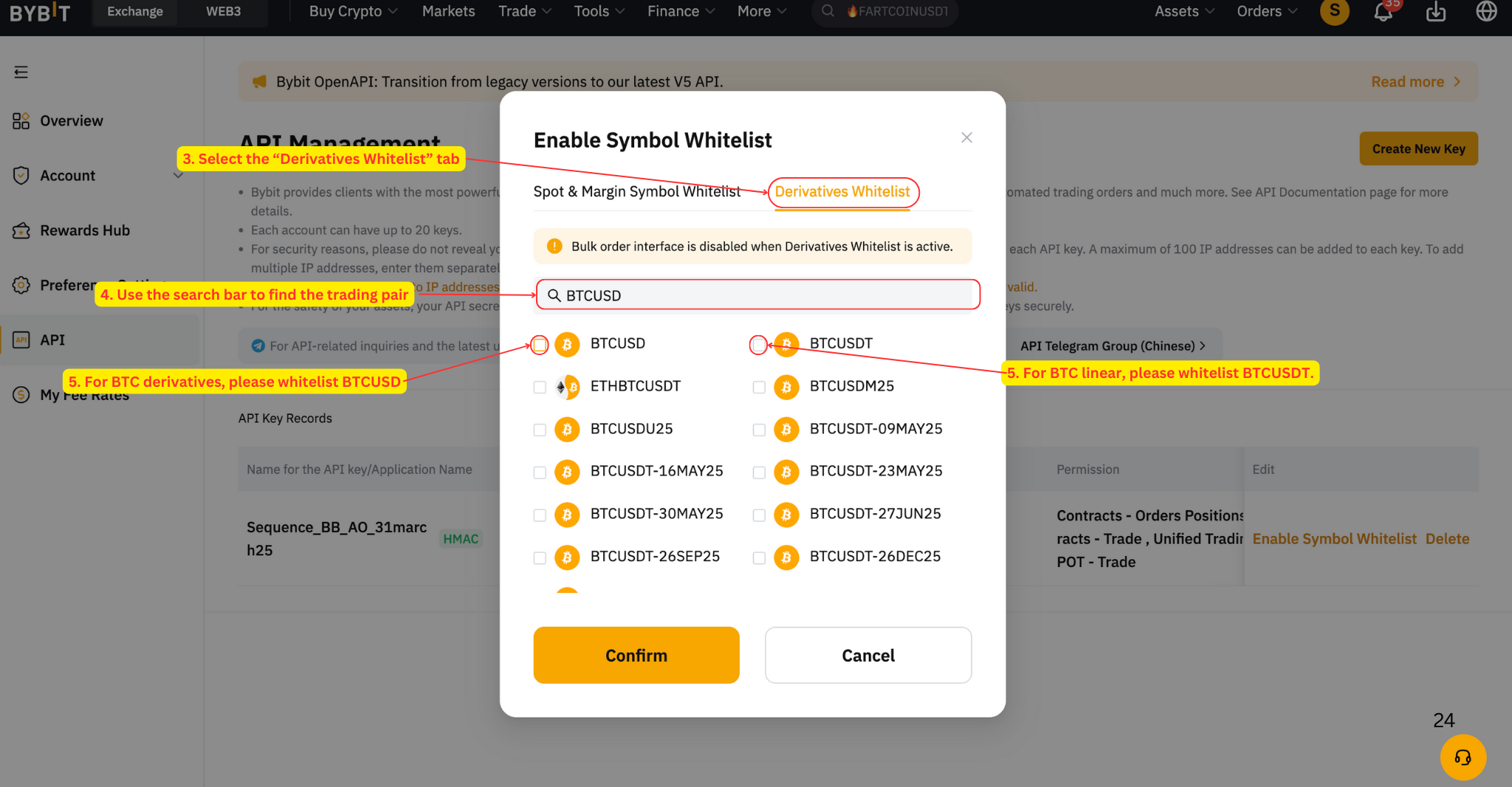
For BTC derivatives, whitelist BTCUSD
For BTC linear, whitelist BTCUSDT
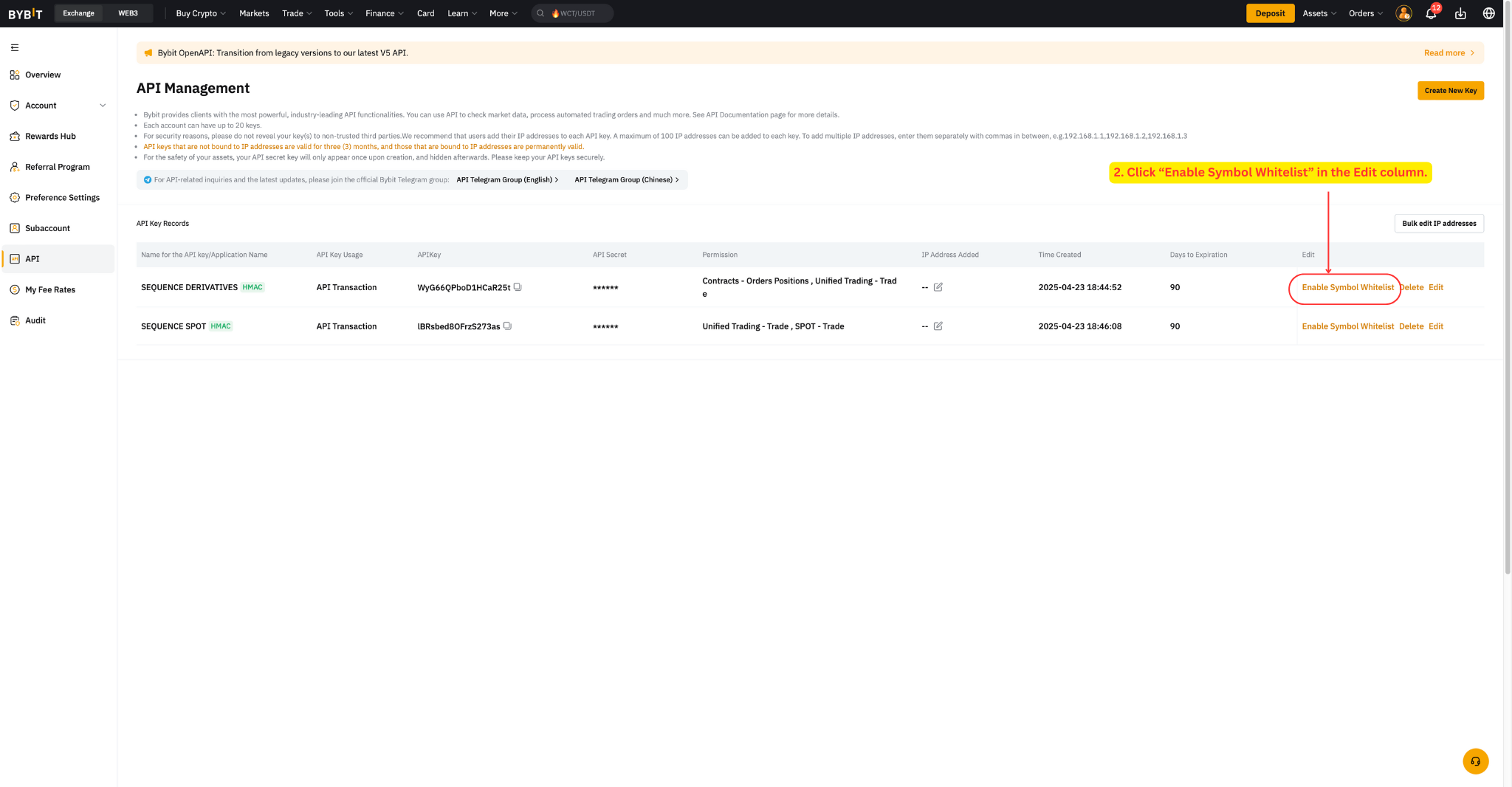
Go to your Bybit account and click API in the sidebar.
Find the API key for Sequence and click Enable Symbol Whitelist in the Edit column.
Select the Derivatives Whitelist tab.
Search for the trading pair (BTCUSD or BTCUSDT).
Check the box next to the pair.
Click Confirm.
Step 7: Submit API Keys to Sequence
Finally, submit your API keys to Sequence so our trading team can configure your chosen strategy. We've created detailed guides for this process:
First time? See the First Time Connecting API Keys guide.
Refreshing keys? See the Refreshing API Keys guide.
Prefer a video walkthrough?
Watch the full setup process in the video below. Please note, this video intentionally has no sound.
Important notes
It is extremely important that only BTC is chosen as the available collateral — you must never use alternate coins as collateral.
Make sure Cross Margin is enabled prior to submitting API keys. Do not change this setting after submitting.
Make sure to whitelist only the following pairs: BTCUSD for BTC derivatives, BTCUSDT for BTC linear.
Additional Information
⁉️ API validity
API validity - is permanent for this method. You remain in full control of your funds at all times. Our platform operates by delivering automated trading signals through your exchange account via API.
Our system is designed to enhance your trading experience while maintaining complete control and security over your assets.
Please visit our intro video on API keys here: What are API Keys?
⁉️ Trade only permissions
The API permissions we require provide strictly controlled access exclusively for executing trades on your exchange platform. To ensure account security, these permissions do not allow for any withdrawal or transfer capabilities of your funds.
⁉️ Security recommendation
To protect your account's security, never share your exchange account login credentials—not even with our team.
What's next?
We recommend reviewing the sections below, which address common questions about what happens next.
🟢 What to expect
The algorithm employs a systematic approach, placing strategic orders based on bidirectional price action.
The algorithm intentionally places smaller trades when price ranges are tight. Therefore during sideways or upward-only price movements, the strategy maintains conservative trade sizes. Conversely, larger trades require more significant price movements in both directions for effective execution and closing.
🟢 Adding funds
The system takes into account the total balance of the account after the close of each trade / before the start of a new trade.
This means that additional deposits can be made at any time and the system will recognize the deposit at the start of the new trade.
For the funds to be recognized, please ensure funds are deposited into the Unified Trading Wallet (on Bybit) or account where you are trading (on other exchanges) AND deposited in the strategy's base currency.
🟢 Withdrawing funds
For security purposes, please notify us before making any withdrawals that exceed 5% of your total wallet balance. This security measure allows our team to safely pause the automated trading functions before processing your withdrawal.
You can submit withdrawal notifications through your user dashboard or by emailing us at support@tradewithsequence.com
For more details, visit our How to Withdraw Funds Safely guide.
🟢 How to monitor your strategy
You can monitor your strategy's performance directly through your exchange interface by looking at the trade history. We recommend doing this in your desktop browser.
For accurate performance tracking, please keep in mind that exchanges display (PnL) metrics in USD terms. This is relevant for any strategy that is accumulating Bitcoin — as the unit of account will be incorrect. You must look or export the close trades and then compare the results in your account.
We recommend reviewing the sections below, which address common questions about what happens next.
Critical Guidelines for Active Strategies
Once your strategy is active, please keep the following in mind to ensure everything runs smoothly:
🔴 Manual trades: Do not perform any manual trades in the sub-account running the algorithm
🔴 Withdrawals: Do not withdraw more than 5% of your total wallet balance without notifying us first
🔴 Non base asset withdrawal: Do not withdraw from any asset other than the coin that you are accumulating
🔴 Non base asset additions: Do not add any currency or coins, other than the base asset you are accumulating
FAQs and Troubleshooting
Bybit Account & Subaccount Setup
Related to: Before You Start and Step 1
Is the Palau ID still valid for KYC verification on Bybit?
As of March 2025, Bybit has suspended the use of Palau ID for verification. There is no confirmed timeline for reinstatement — it is pending the Palau authorities' digital ID verification program launch.
If you already completed KYC with a Palau ID, your existing verification may still be active, but we recommend not attempting to renew or update using a Palau ID at this time. If you need an alternative, please contact our support team to discuss other options.
If you wish to trade derivatives using a Palau ID, an alternative exchange that currently supports this verification method is BloFin.
What KYC level do I need to trade derivatives on Bybit?
You need at least Level 1 KYC verification to access inverse derivatives trading on Bybit. If your API keys are rejected due to KYC issues, it typically means your Bybit account hasn't completed the required verification level. Complete your KYC verification first, then generate new API keys.
Do I really need a sub-account, or can I just use my main Bybit account?
Technically, if you are only running a single bot, you could use your main Bybit account. However, we strongly recommend using a dedicated sub-account for the following reasons:
Using a sub-account prevents manual trades or other activities from interfering with the algorithm's logic
It ensures clean separation of your funds, allowing for more accurate PnL tracking and risk management
Each strategy requires its own environment; if you decide to add a second bot in the future, a sub-account structure will already be required
By keeping your main account separate, you protect your trading strategy from accidental disruptions and ensure the algorithm performs at its best.
I want to run a second strategy. Do I need another sub-account?
Yes. Each Sequence strategy requires its own dedicated sub-account. Create a new sub-account following the same steps in this guide, fund it separately, and generate a new set of API keys for each one.
Funding
Related to: Step 2
Do the funds go into my main Bybit account or the sub-account?
Funds must be in the Unified Trading wallet of your sub-account — not your main account and not the sub-account's Funding wallet. Use the internal transfer feature: go to Assets → Transfer → select "Across sub-account(s)" → transfer from your Main account "Funding/Unified Trading" to your sub-account's "Unified Trading" wallet.
Can I start with EUR or USD, or do I need to convert to BTC first?
For BTC derivatives strategies, you need BTC in your sub-account — not EUR, USD, or USDT. If you have fiat currency, you will need to buy BTC first (you can do this on Bybit's main account via "Buy Crypto"), then transfer the BTC to your sub-account's Unified Trading wallet. The minimum required balance is 0.2 BTC.
I'm getting an "Insufficient Funds" error, but I already funded my sub-account. What's wrong?
This usually means the funds are in the wrong wallet. Verify that your BTC is in the Unified Trading wallet of your sub-account — not in the Funding wallet, and not in your main account. Also verify that the amount meets the minimum requirement (0.2 BTC for BTC derivatives). You can check by switching to your sub-account and navigating to Assets → Unified Trading.
How do I transfer funds from another exchange (e.g., Kraken, Coinbase) to my Bybit sub-account?
First, send your BTC from the external exchange to your Bybit main account (use the main account's BTC deposit address). Once the deposit is confirmed, use Bybit's internal transfer to move the BTC from your main account to your sub-account's Unified Trading wallet, as described in Step 2 of this guide.
Cross Margin & Collateral
Related to: Steps 3–4
I submitted my API keys without enabling Cross Margin first. What should I do?
If Cross Margin was not enabled before submitting your API keys, our system will be unable to activate your strategy. Please contact support@tradewithsequence.com — we will need to reset your connection so you can enable Cross Margin and resubmit your API keys. To avoid this, always complete Steps 1 through 4 before creating your API keys in Step 5.
Why can I only use BTC as collateral? Can I use USDT or other coins?
For BTC inverse perpetual strategies, the contract is denominated and settled in BTC, so your collateral must also be in BTC. Using alternative coins as collateral can cause margin calculation issues and may lead to unexpected . This is why the guide requires you to select only BTC in the collateral settings and disable all other assets.
API Keys
Related to: Steps 5–6
What exactly is an API Secret? Is it a password I created?
No — the API Secret is automatically generated by Bybit when you create a new API key. It is not a password you choose. When you create the API key, Bybit will display both the API Key and the API Secret on screen. Copy and save both immediately — the API Secret is only shown once and cannot be retrieved later. You will need to provide both the API Key and API Secret to Sequence.
My API Secret is hidden/obfuscated and I didn't copy it. Do I need a new sub-account?
No. You do not need a new sub-account. The API Secret cannot be retrieved once the creation screen is closed, but you can simply create a new API key from the same sub-account. Delete the old key and generate a fresh one — then copy and save both the new API Key and API Secret before closing the screen.
What permissions should I set when creating the API key?
Enable Read and Trade permissions only. Never enable Withdrawal permissions — Sequence does not need them and will never withdraw your funds. Also make sure to whitelist the correct trading pair: BTCUSD for BTC inverse derivatives, or BTCUSDT for BTC linear strategies.
Will my API key expire? Do I need to renew it?
If you completed the IP whitelisting step during the connection process — whether through the First Time Connecting API Keys guide or the Refreshing API Keys guide — your API key will be permanent and will never expire.
However, if the IP addresses were not added correctly, your API key will default to a 90-day expiration. Please note that neither Bybit nor Sequence will send you a reminder before your key expires. If your key expires, you will need to create and submit a fresh set of API keys.
How do I refresh/renew my API key?
You do not need to create a new sub-account. As outlined in Step 5, simply go to your existing sub-account → Account → Security → API Management, and create a new API key using the same settings (Read + Trade permissions and the correct trading pairs whitelisted). Once created, submit the new API Key and API Secret through your API Connection Manager.
You may safely delete the old API key only after our trading team has confirmed that it is safe to do so.
My API keys were rejected due to a "KYC issue." What does that mean?
This indicates your Bybit account hasn't completed the required KYC verification level for inverse derivatives trading. You need at least Level 1. Complete your verification on Bybit, then generate new API keys and resubmit. If you're in a region where derivatives are restricted, KYC completion alone won't resolve this — see the "Before you start" section.
Why does my API keep disconnecting despite refreshing it?
There are a few common reasons this can happen:
Bybit platform updates: Bybit occasionally rolls out system updates that invalidate API keys created before the update. When this happens, previously working keys — even permanent ones — may stop functioning. The solution is to create a new set of API keys from the same sub-account and resubmit them through the Refreshing API Keys guide.
IP addresses were not bound: If the IP whitelisting step was not completed during setup, your key defaults to a 90-day expiration and will disconnect when it expires. Check your API Management page on Bybit — if the expiration column shows a date instead of "Permanent," this is the issue. Follow the Refreshing API Keys guide and make sure to complete the IP whitelisting step.
Bybit system issues: In rare cases, Bybit's systems may experience temporary disruptions that cause API connections to drop. If your key settings look correct and you've recently refreshed, contact support@tradewithsequence.com — we can verify on our end whether a new set of keys is needed.
API Key Submission
Related to: Step 7 and What's Next?
How do I refresh/renew my API key?
You do not need to create a new sub-account. As outlined in Step 5, simply go to your existing sub-account → Account → Security → API Management, and create a new API key using the same settings (Read + Trade permissions and the correct trading pairs whitelisted).
Once created, submit the new API Key and API Secret through your API Connection Manager.
You may safely delete the old API key only after our trading team has confirmed that it is safe to do so.
The 2FA verification code doesn't arrive when I try to refresh my API. What should I do?
Remember that your sub-account has its own 2FA, which is distinct from your main account's 2FA. Make sure you're using the correct authenticator entry for the sub-account. If the code still doesn't arrive, try: (1) check your spam/junk folder for email-based 2FA, (2) ensure your authenticator app is synced correctly, or (3) contact Bybit support directly to troubleshoot your 2FA setup.
I'm getting the error "This API key is already active" when trying to connect. What does this mean?
This means you're trying to submit an API key that's already in the system. Our system recognizes even incomplete submissions. Please try these troubleshooting steps:
Generate completely new API keys (don't reuse existing ones)
Clear your browser cache, cookies, and history, or try using a different browser
Submit the new keys again
If the issue persists after trying these steps, please share a screenshot of the error message.
Why does the Bybit interface show 2x if the strategy uses 1.5x?
Once your strategy is active and you have received the "Strategy update – Your strategy has launched" email (including your Bot ID), you may notice that the Bybit interface displays a default leverage of 2x.
This is simply a visual default set by Bybit. Sequence's strategy uses only 1.5x leverage, regardless of what is shown in the interface.
There is no need to manually adjust this setting — the leverage is controlled directly by the Sequence algorithm behind the scenes. The value displayed in the UI does not affect how trades are executed or managed.
How can I confirm that my strategy is active?
Once your strategy has been successfully launched, you will receive a confirmation email from our Trading Team notifying you that your strategy is live.
If you have already submitted your API keys and have not yet received this confirmation, please contact our support team at support@tradewithsequence.com so we can assist you.
Ongoing Updates
This section is regularly updated to include questions and reflect changes in trading strategies and platform features.
More questions? support@tradewithsequence.com