
Binance Derivatives - Setup Guide
How to connect your Binance derivatives account to Sequence.
Table of contents
Key terms on this page
This comprehensive guide walks you through the full process of setting up your Binance — from funding and margin configuration to creation and submission to Sequence.
The guide is organized into the following sections:
Available Strategies on Binance International:
Before you start
Make sure you have your Client ID and Bot ID ready.
Please contact us to receive your Sequence User ID and BOT ID. These identifiers are essential throughout the setup process and are unique to your account. Contact us at support@tradewithsequence.com to obtain them.
You can locate this information in any of the following places:
• The email with setup instructions that we sent when you first added the strategy from your Main Dashboard
• Your bot launch email
• Your invoice
• API refresh reminder emails (sent a few days before your APIs expire)
Example:
Client ID = 0x001 /
BOT ID = 0x001 / Fibonacci / Hxq01
Use a Desktop Browser for Best Results.
We strongly recommend completing the setup process on a desktop browser, preferably Chrome. In our experience, doing this on a mobile web browser can be quite difficult — while not entirely impossible, the process is significantly less smooth. Additionally, API configuration is not supported in the native exchange applications (e.g., the Binance or Bybit mobile apps), so it's important to use a desktop environment for a successful setup.
Jurisdictional Restrictions on Derivatives Trading
Please be aware that some jurisdictions restrict access to futures and derivatives trading. While exchanges such as Binance do not publish a complete list, these products are typically not available to users in certain regions. Countries with known restrictions include the Netherlands, Spain, United Kingdom, Italy, United States, and Canada, as well as any jurisdiction where the exchange is not officially licensed to operate.
If you're unsure whether your region is affected, one easy way to find out is to log into your futures account and try placing a test trade. The order can be cancelled immediately afterward. If your jurisdiction is restricted, the platform will typically block the attempt or display a clear error message.
Primary Email Requirement
Your registered email is the one linked to your active strategy or bot, and it’s the only one authorized to receive private account information. 2FA codes, invoices, and sensitive support responses will only be sent to this email.
Microsoft Email Users (Hotmail / Outlook / MSN / Live) & Zigglo:
If you’re using an email address from Hotmail, Outlook, MSN, Live, or any other Microsoft-related domain, please note that these are not compatible with key features in Sequence. Please contact us at support@tradewithsequence.com to get this resolved.
Step 1: Create a sub-account
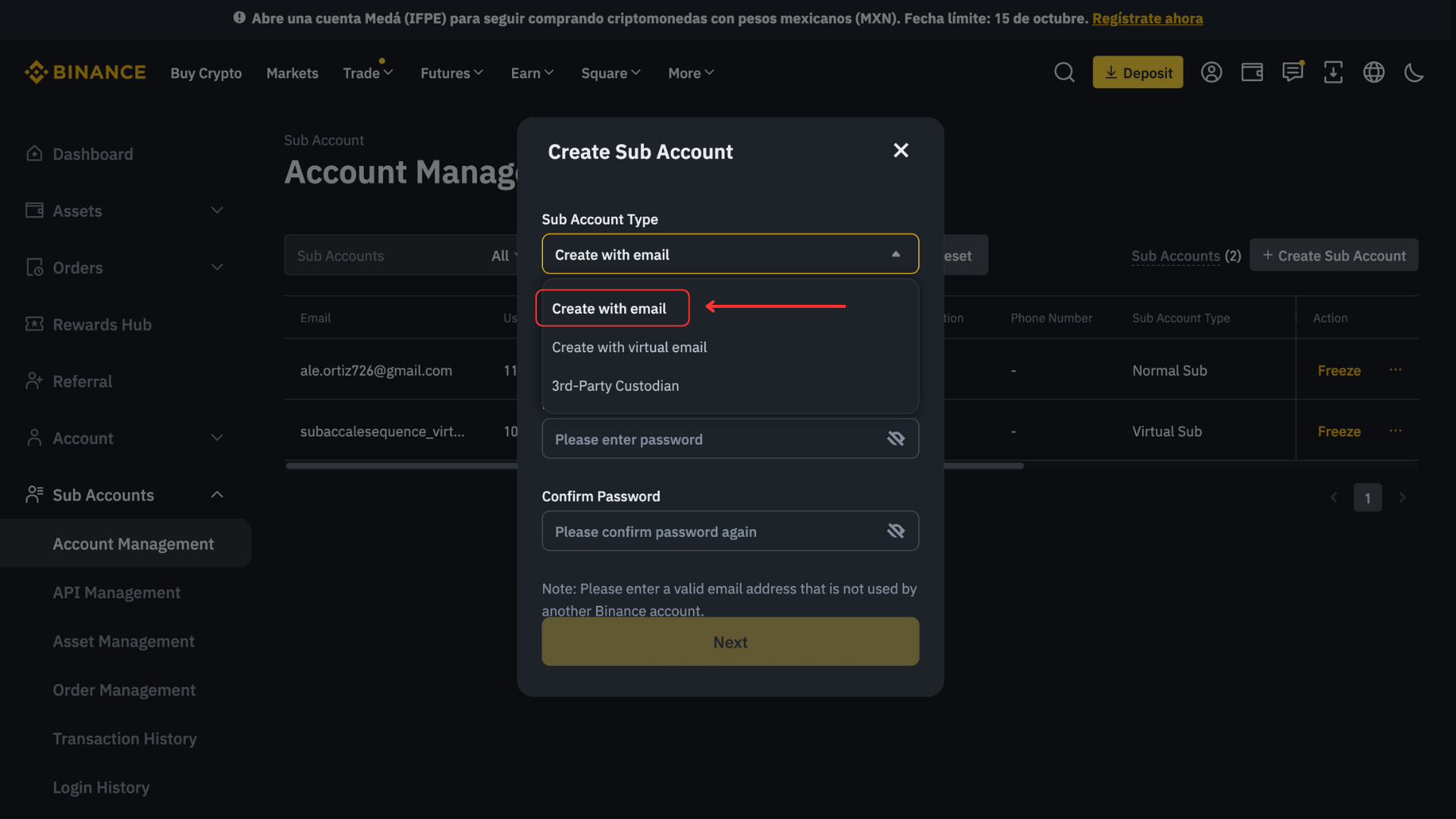
First, create a dedicated sub-account exclusively for trading with Sequence. Each strategy requires its own sub-account to ensure optimal performance — do not manually modify positions or place trades within it.
Please create the sub-account using email, as the virtual email option is not compatible with sequence. Please visit the Binance guide on how to create a sub account.
Step 2: Transfer funds
Adding funds to your account: Please view the Binance guide on how to deposit funds
Moving funds to futures wallet: Please view the following Binance guide on how to move funds to "Futures COIN-M" wallet.
Please note to trade Derivatives in Binance your funds need to be located in the “Futures COIN-M” wallet.
Step 3: Create API keys
Please see the following Binance guide for creating API keys.
⚠️ Make sure you have a secure notepad to copy and paste your API key details.
Step 4 👉 Submit API keys to Sequence
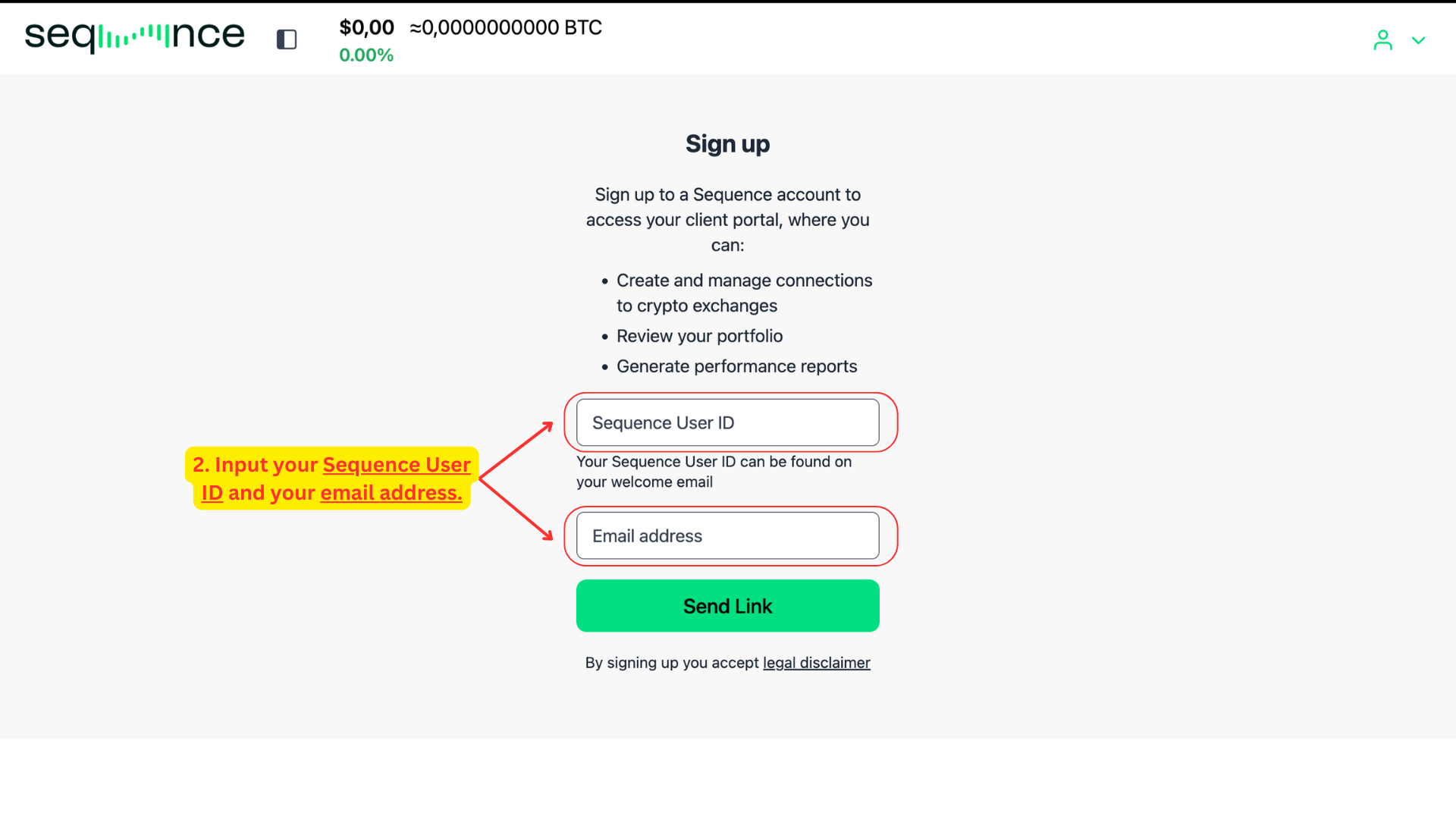
Locate your Sequence User ID and primary email address. You can find these details in the email provided by Sequence. Make sure you have the following ready:
• Your Sequence User ID
• Your registered Email Address – This must match exactly, including capitalization. If you’re unsure, copy and paste the email address from your most recent 2FA email. Be sure not to include any extra spaces.
Visit the signup page. Go to: https://api.tradewithsequence.com/signup and input your Sequence User ID and your email address. Please note: the email field is case sensitive. Be sure not to include any extra spaces.
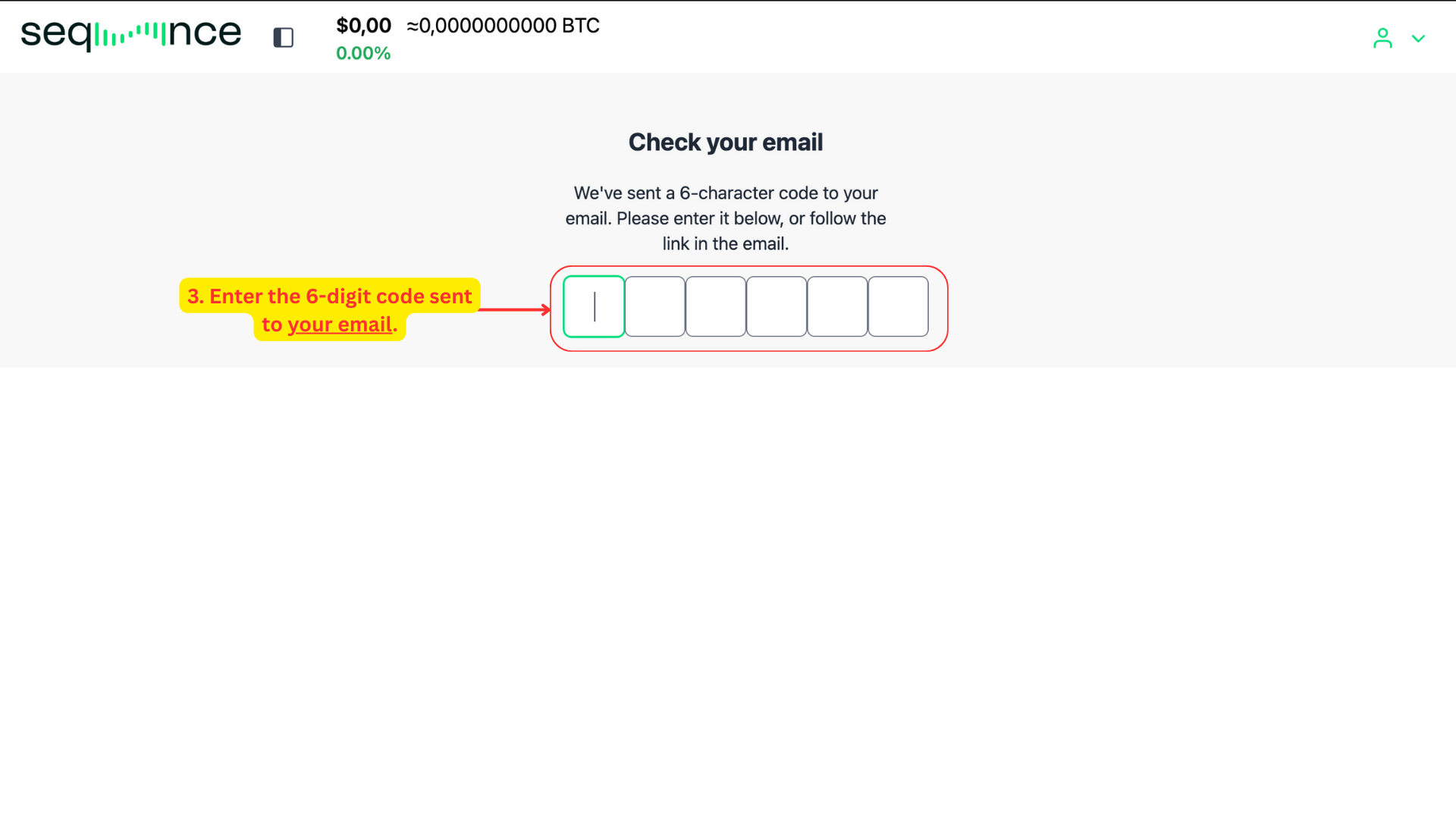
Verify your email. Once you’ve submitted your User ID and email, a 6-digit verification code will be sent to your inbox.
Enter the code on the screen to confirm your identity.
Alternatively, you can click the link included in the email to complete the process automatically.
Tip: If the email doesn’t appear within a minute, make sure to check your spam or promotions folder.
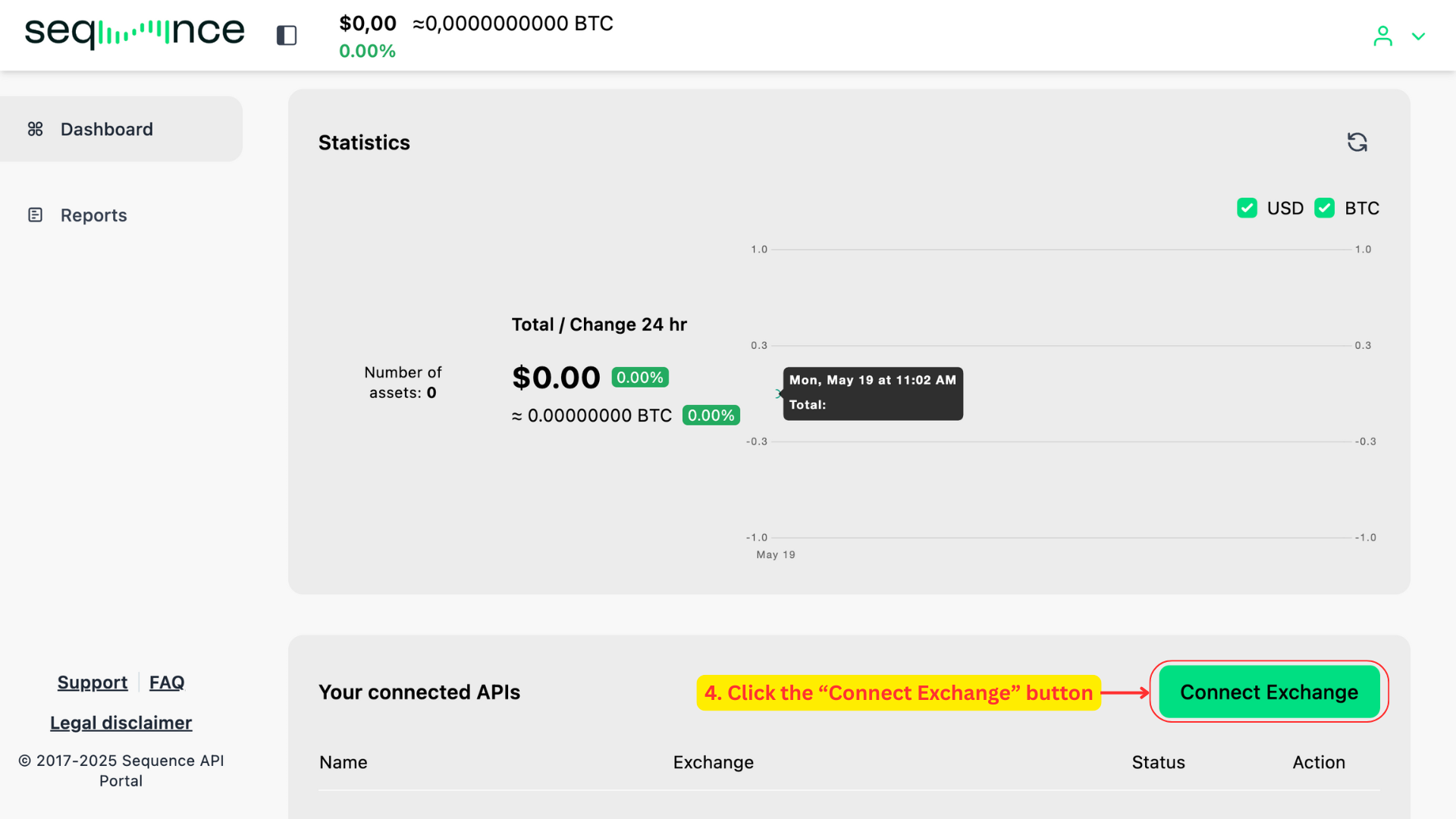
Connect your exchange. Once you’ve successfully logged in, you’ll land on your Sequence dashboard. Navigate to the bottom right of the screen and click the “Connect Exchange” button. A modal dialog will appear on the left-hand side of your screen.
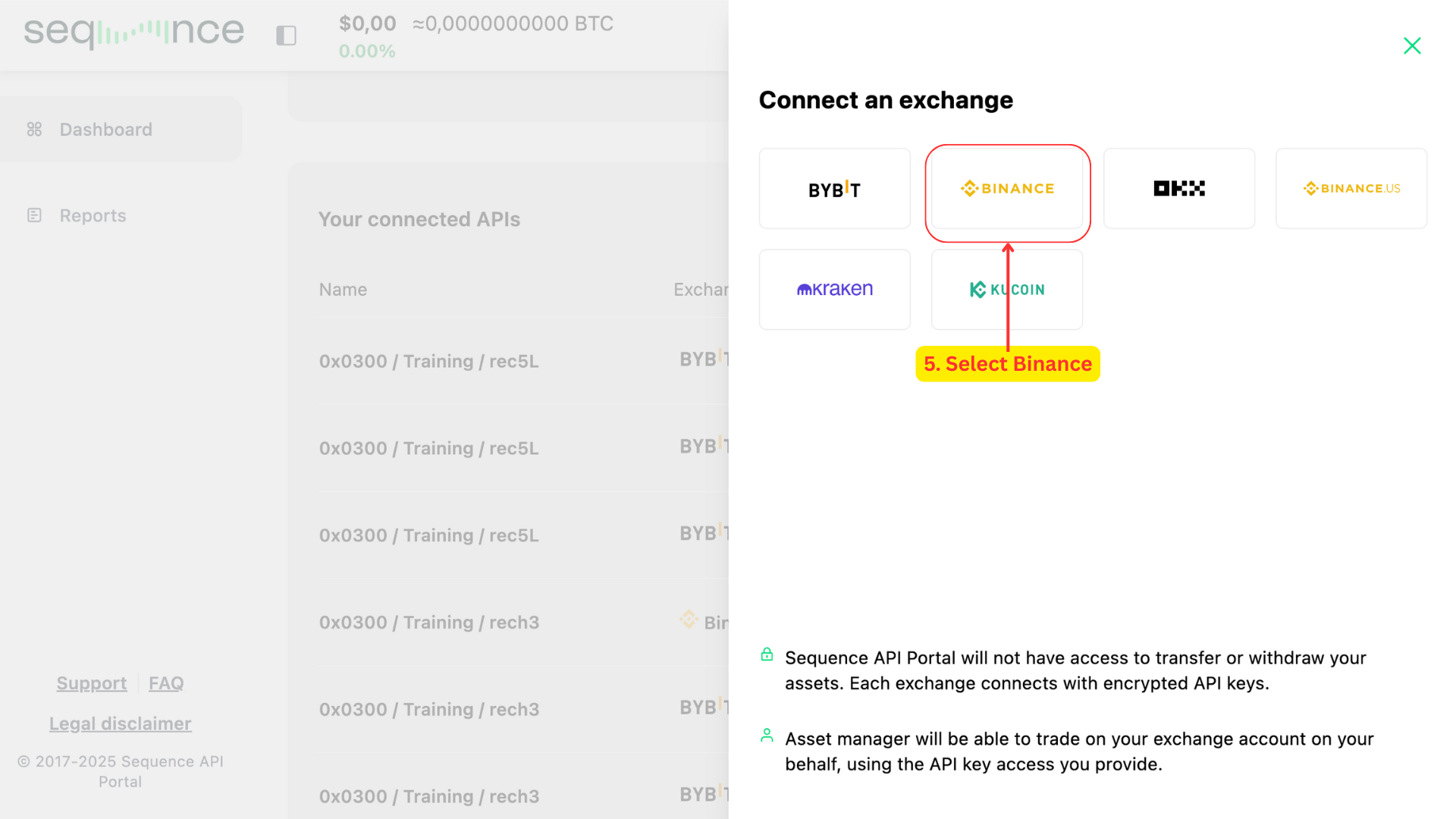
Select Binance. From the modal that appears on the right, click on the Binance icon.This will trigger a second view in the same modal.
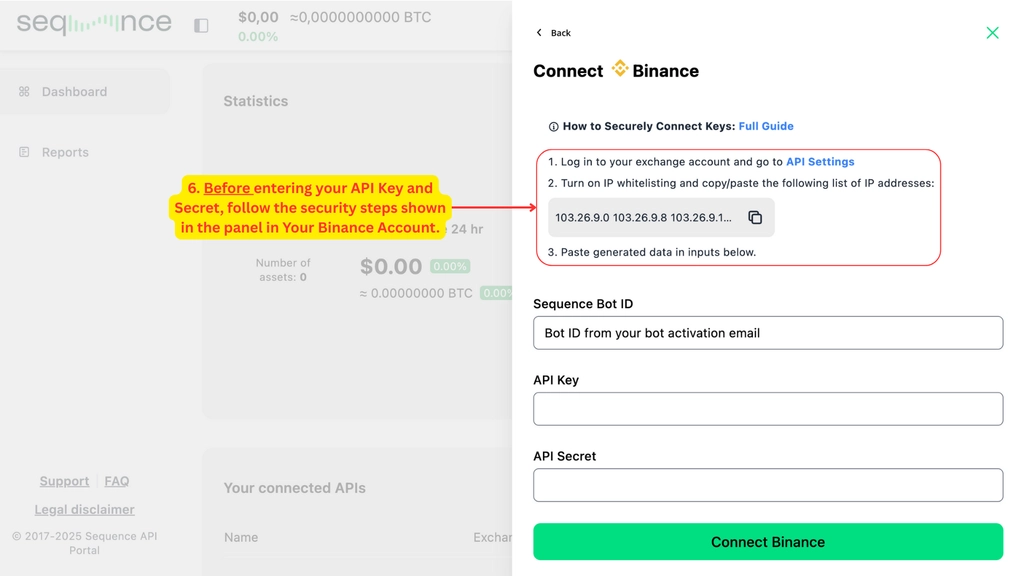
Prepare your Binance IP settings.
Before entering your API Key and Secret, follow the on-screen security instructions:
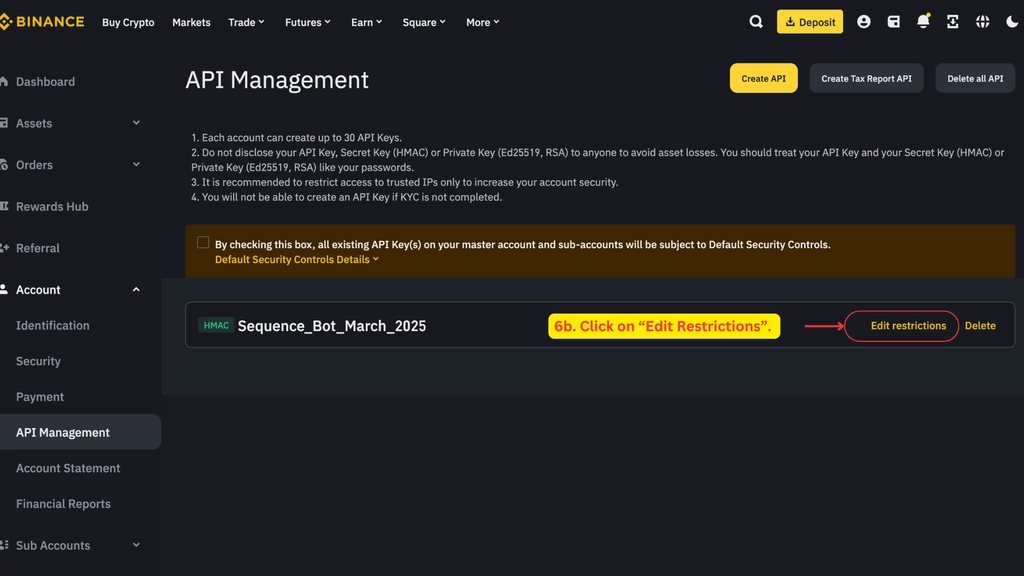
Log in to your Binance dedicated sub-account and go to the API Management section.
Click on “Edit Restrictions”.
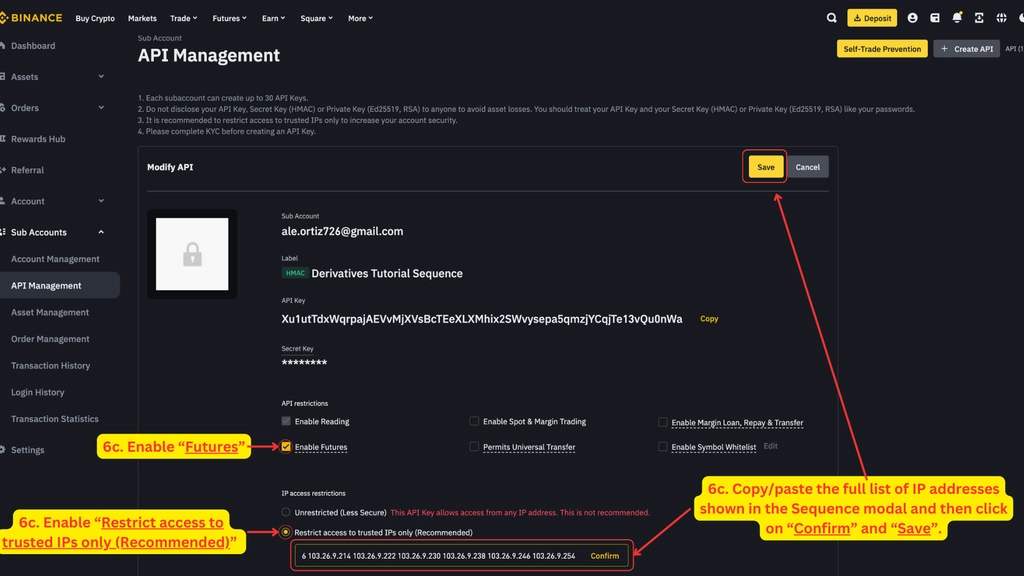
On the API settings screen:
Enable “Futures”.
Enable “Restrict access to trusted IPs only (Recommended)”.
Copy-paste the IP addresses provided in the Asset Manager panel. For guidance on how to find them, see the instructions in step 6a.
Click “Confirm”
Click “Save”
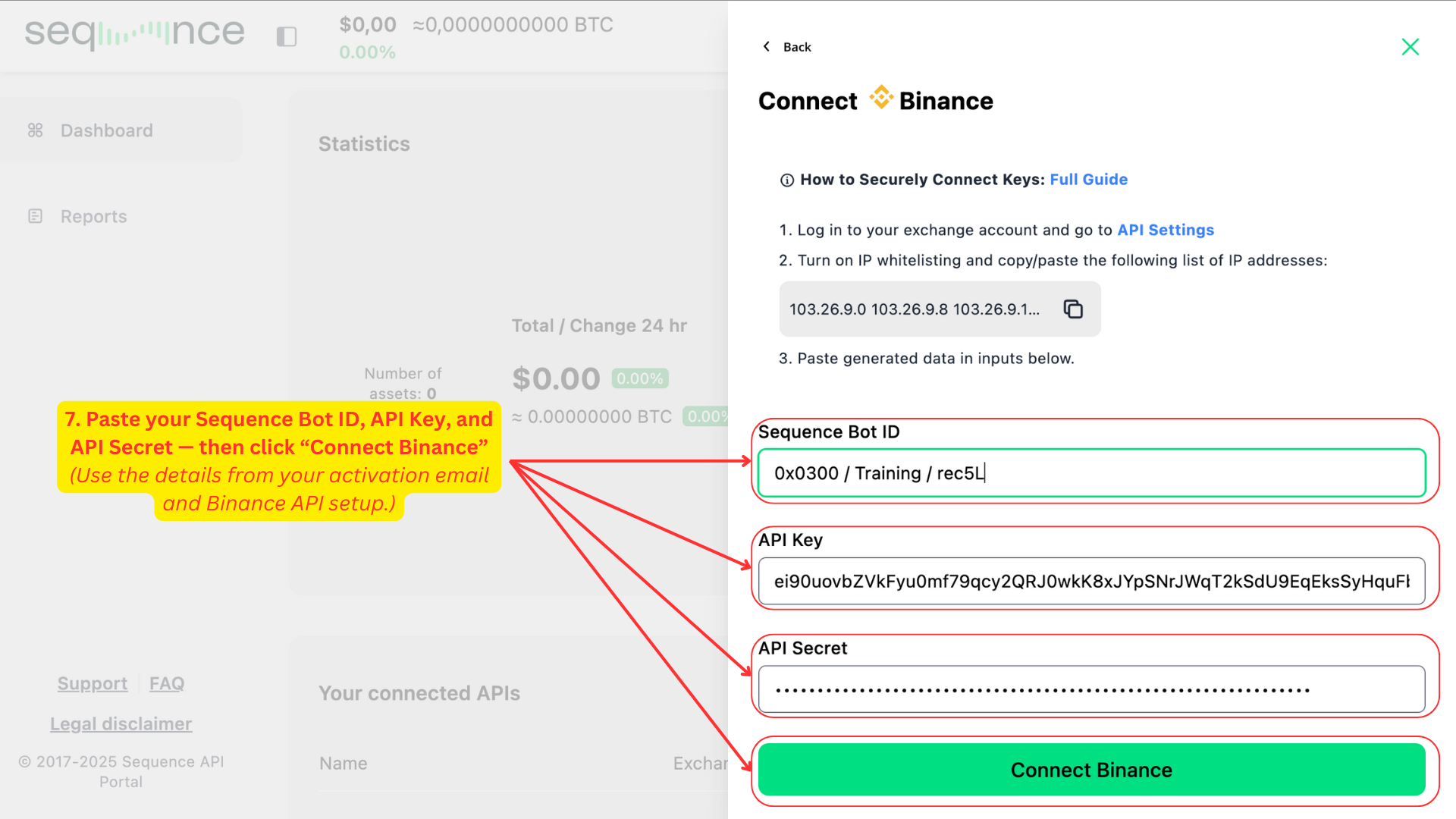
Enter your API credentials and connect. Once completed the IP Whitelisting, return to the Sequence portal and proceed with entering your credentials.
Paste your Sequence Bot ID.
Enter your API Key and API Secret from Binance.
Click Connect Binance to complete the integration.
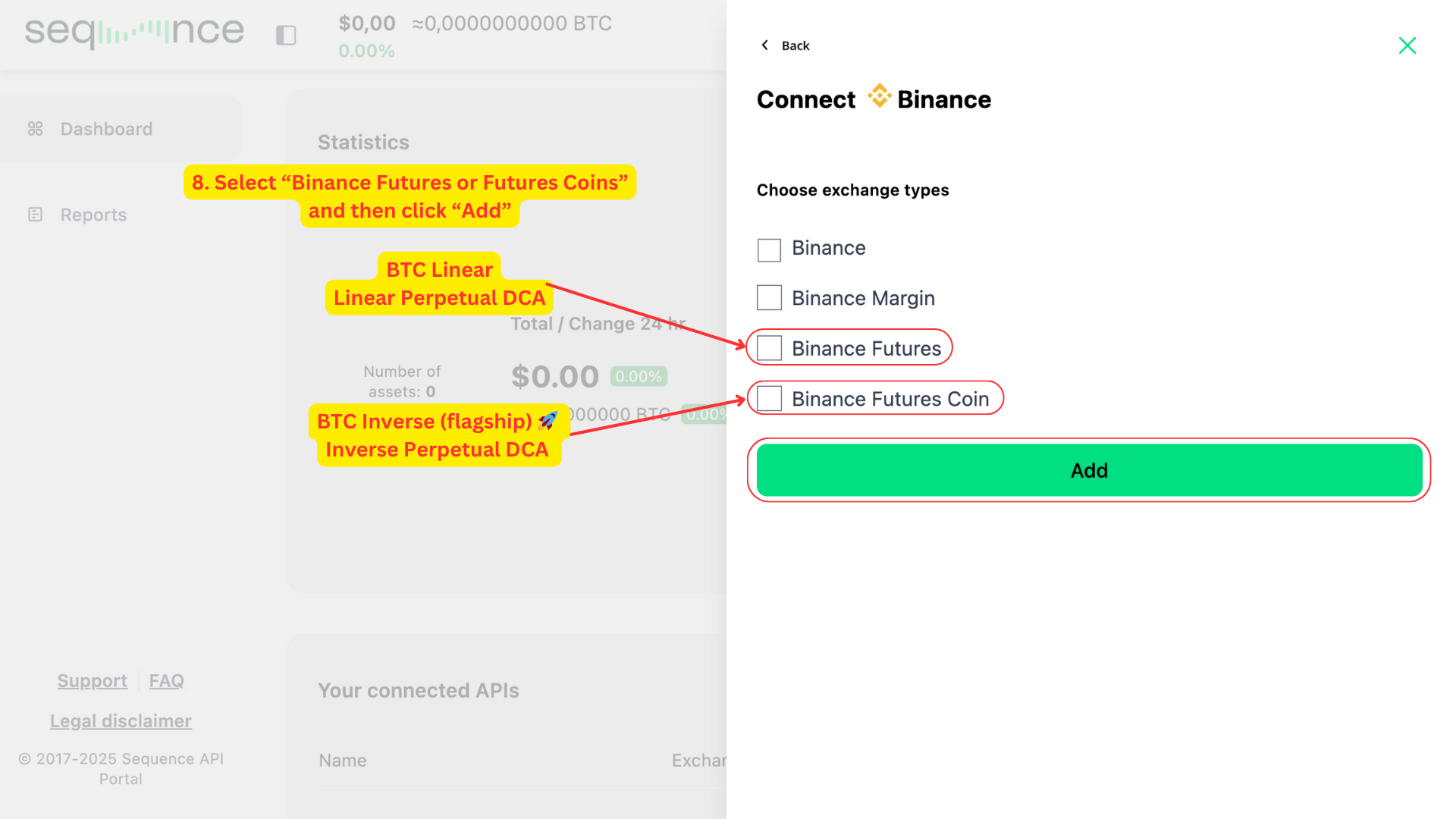
Choose the correct Binance exchange type
Select the appropriate exchange type for your account:
BTC Inverse 🚀 → Binance Futures Coin
Once selected, click Add to complete the connection setup. You’ll see a confirmation message: “Account successfully connected!”
What's next?
Once you submit your API keys through the API Connection Manager, you will receive an email confirming that your connection has been received, and you will also see the connection reflected in your API Connection Manager.
Within 24 hours, our Trading Team will review your connection. If your API key configuration and account setup are correct, your strategy will be launched and you will receive a confirmation email notifying you that your strategy is live.
If you do not receive any of these emails, please contact us directly at support@tradewithsequence.com so we can assist you.
In the meantime, we recommend reviewing the sections below, which address common questions about what happens next.
🟢 What to expect
The algorithm employs a systematic DCA approach, placing strategic orders based on bidirectional price action.
The algorithm intentionally places smaller trades when price ranges are tight. Therefore during sideways or upward-only price movements, the strategy maintains conservative trade sizes. Conversely, larger trades require more significant price movements in both directions for effective execution and closing.
🟢 Adding funds
The system takes into account the total balance of the account after the close of each trade / before the start of a new trade.
This means that additional deposits can be made at any time and the system will recognize the deposit at the start of the new trade.
For the funds to be recognized, please ensure funds are deposited into the Unified Trading Wallet (on Bybit) or account where you are trading (on other exchanges) AND deposited in the strategy's base currency.
🟢 Withdrawing funds
For security purposes, please notify us before making any withdrawals that exceed 5% of your total wallet balance. This security measure allows our team to safely pause the automated trading functions before processing your withdrawal.
You can submit withdrawal notifications through your user dashboard or by emailing us at support@tradewithsequence.com
For more details, visit our How to Withdraw Funds Safely guide.
🟢 How to monitor your strategy
You can monitor your strategy's performance directly through your exchange interface by looking at the trade history. We recommend doing this in your desktop browser.
For accurate performance tracking, please keep in mind that exchanges display (PnL) metrics in USD terms. This is relevant for any strategy that is accumulating Bitcoin — as the unit of account will be incorrect. You must look or export the close trades and then compare the results in your account.
Critical Guidelines for Active Strategies
Once your strategy is active, please keep the following in mind to ensure everything runs smoothly:
🔴 Manual trades: Do not perform any manual trades in the sub-account running the algorithm
🔴 Withdrawals: Do not withdraw more than 5% of your total wallet balance without notifying us first
🔴 Non base asset withdrawal: Do not withdraw from any asset other than the coin that you are accumulating
🔴 Non base asset additions: Do not add any currency or coins, other than the base asset you are accumulating