
How to Withdraw Funds Safely
Best practices and essential steps for secure fund withdrawals from your exchange.
Table of contents
Key terms on this page
To ensure the continued performance of your active strategies, withdrawals must be handled with care. While your funds remain on your exchange at all times, following the correct procedure is vital to avoid disrupting open positions or algorithm logic.
Before you withdraw, please review the following safety steps!
We've broken it up into sections:
Overview
✅ Up to 5% of your total balance per trade window → Safe to withdraw anytime.
⚠️ More than 5% → You must notify Support so we can safely pause the bot.
📝 Withdrawals should be made in the base asset only — not the quote asset.
🪙 Your must always hold the minimum required balance for the strategy to continue operating safely and avoid interruptions in trading activity.
Why This Matters?
The algorithm determines and executes its logic based on the total wallet balance of the sub-account where it operates, measured at trade initiation. The full balance at the time the trade opens is used to calculate every order size and safety-layer allocation.
Withdrawing funds mid-trade disrupts this structure, interfering with the algorithm’s DCA logic and potentially causing order execution failures that can lead to financial losses. In leveraged products, such disruptions can even trigger account during sharp or events.
A 5% withdrawal buffer per trade window is built into the system to provide limited flexibility without disrupting the system trading logic.
What is a Trade Window?
A trading window refers to the complete lifecycle of a trade — from the moment the algorithm places the initial base order until the trade is fully closed.
During this period, the bot actively determines order sizing, scaling, and safety-layer allocation throughout the trading window.
While the trade remains open, your balance is reserved to support potential DCA orders as defined by the algorithm’s trade logic.
To maintain flexibility, the algorithm’s design allows withdrawals of up to 5% total wallet balance of the sub-account during an active trading window — this buffer ensures the system’s integrity remains intact.
Once the trade closes, the trading window resets, and a new one begins automatically.
Safety Step 1: Check Your Withdrawal Limit
Calculate the safe withdrawal buffer based on 5% of the total wallet balance of the sub-account. This applies to both Spot and strategies
Withdraw only in the base asset (e.g., BTC for BTC bots, USDT/C for USD/ALT bots).
No need to contact Support if the amount is below 5%.
💡 Example: If your balance is 0.5 BTC, you may safely withdraw up to 0.025 BTC during the current trade window.
Safety Step 2: Notify Us for Larger Withdrawals
If you wish to withdraw more than 5% of your total balance, please notify us using one of the following options:
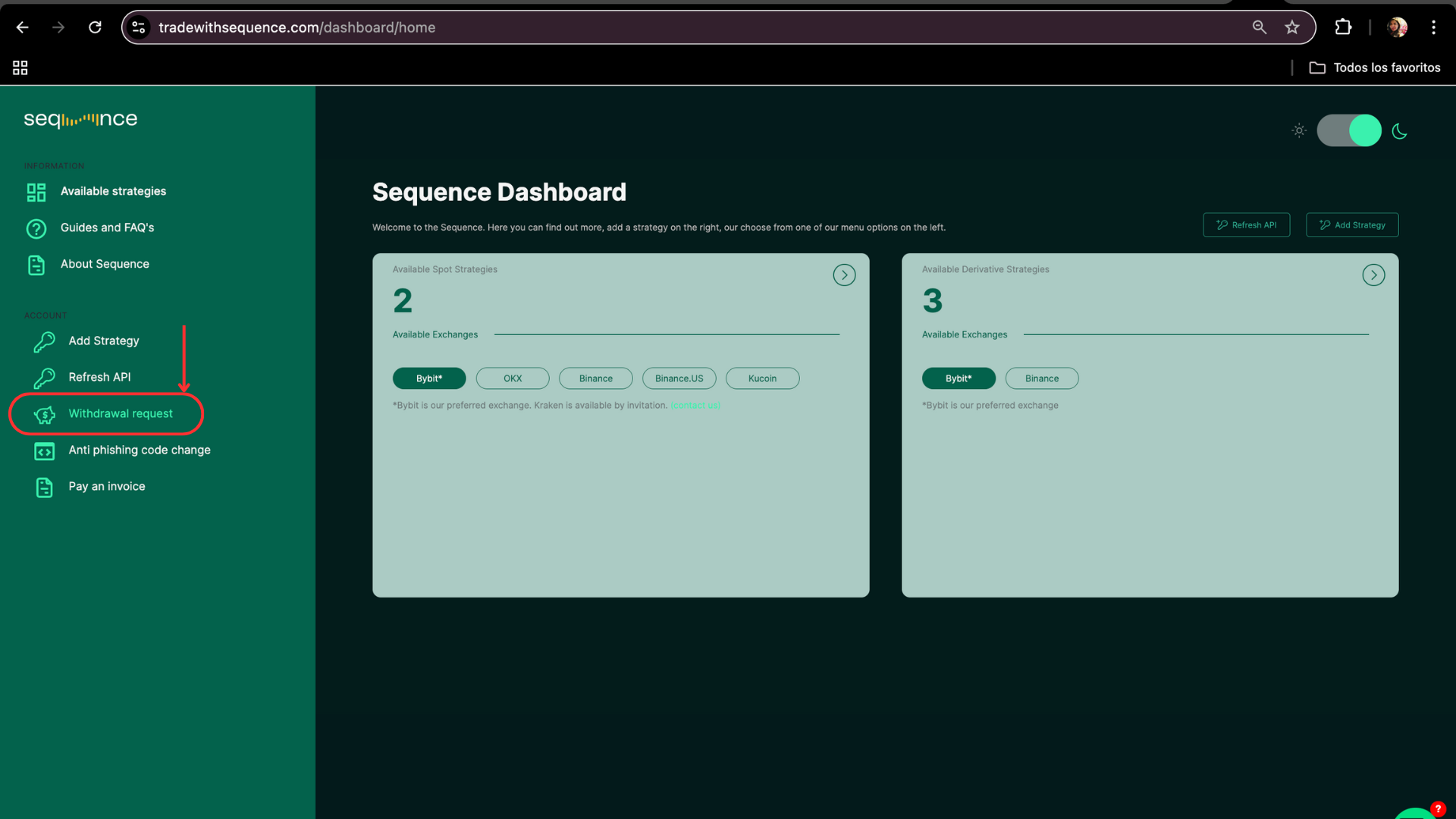
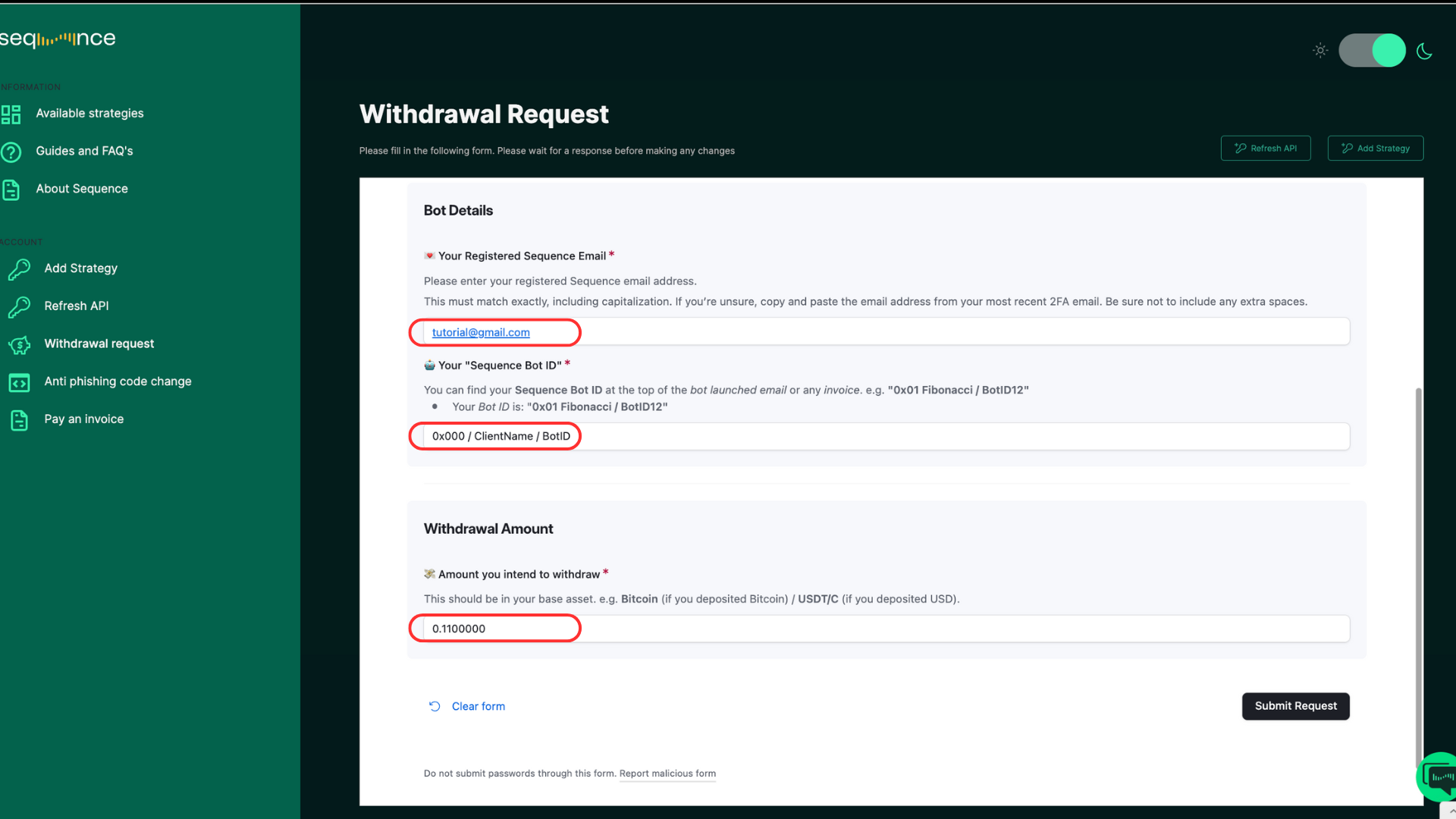
Submit a request via the Main Dashboard
Log in to the Main Dashboard
On the left panel, click Withdrawal Request
Fill out the form with:
Strategy ID
Amount
Click Submit Request
You’ll immediately receive an email acknowledgment confirming your request
Send us an email at support@tradewithsequence.com
Include:
Your Sequence Bot ID (e.g. 0x000 / ClientName / BotID )
The total amount you want to withdraw
This notification allows our traders to safely disconnect the automated trading system, preventing any potential risks that may arise during the withdrawal process.
What Happens Next?
Once your request is received, your bot will be set to stop at the next available opportunity following the algorithm’s built-in design logic.
Please note: Depending on market conditions, this process can take anywhere from a few hours to an indeterminate period, as the algorithm waits for favorable conditions to exit profitably.
When a bot is set to stop, it means:
It will continue monitoring and managing the current trade until it is fully closed.
It will not open any new trades once the active trade has closed.
Once the trade closes, our team will notify you that it’s safe to proceed with your intended withdrawal.
⚠️ Do not withdraw funds before receiving confirmation from Support.
Unannounced withdrawals can:
Disrupt the algorithm’s DCA logic
Leave open orders active on your exchange
Lead to financial losses or potential account liquidation in derivatives strategies
How to Reactivate Your Strategy?
After Your Withdrawal
Verify Minimum Funding Requirements
Ensure your sub-account remains funded with at least the minimum balance in the base asset:
BTC Derivatives: 0.2 BTC
BTC Spot: 0.2 BTC
USD Spot: $20,000 ( $30,000 for the full strategy )
Notify Support to Resume Trading
Email support@tradewithsequence.com confirming you’re ready to restart.
Our trading team will reconnect your bot and resume automated trading.
⚠️ Important: Bots do not restart automatically after a withdrawal.
FAQs
What Happens if I Withdraw All Funds Without Notifying Support?
Withdrawing your entire balance without prior notice immediately disrupts the algorithm’s trade logic. When this occurs, the bot automatically pauses, as it can not longer execute its sequence correctly.
In such cases:
The active trade is force-frozen.
You will absorb any potential losses resulting from the interrupted trade
Any pending orders on your exchange may remain active and must be manually canceled from your side.
Your will stay active until you manually delete them from your exchange account.
A final invoice will be issued within a few days, accounting for all realized profits up to that point.
⚠️ If you wish to withdraw ASAP: Please contact: support@tradewithsequence.com before proceeding so our trading team can assess your live trade status and provide options accordingly.
Can I withdraw profits while the bot is running?
Yes — as long as the amount is under the 5% limit per trade window.
Can I pay my Sequence invoice using the same funds?
Yes.
You may use the funds from your active trading sub-account to pay your Sequence invoice, provided the withdrawal amount stays within the 5% safety threshold of your total wallet balance.
Are my funds locked?
No — your funds are never locked. You retain full control and can withdraw at any time.
However, withdrawals made during an active trade may affect the algorithm’s DCA logic, so we recommend keeping withdrawals within the 5% safety buffer or contacting support@tradewithsequence.com before proceeding.
I’m trading Derivatives, how can I know when a trading window has closed?
In Derivatives strategies, a trading window ends when the active position has been fully closed — meaning all contracts accumulated during the DCA buy phase have been sold back into your base asset, and no pending orders remain on the exchange.
Please note: Derivatives strategies include a 120-seconds cool-off period between trade closure and the next trade initiation. No new trades are executed during this time.
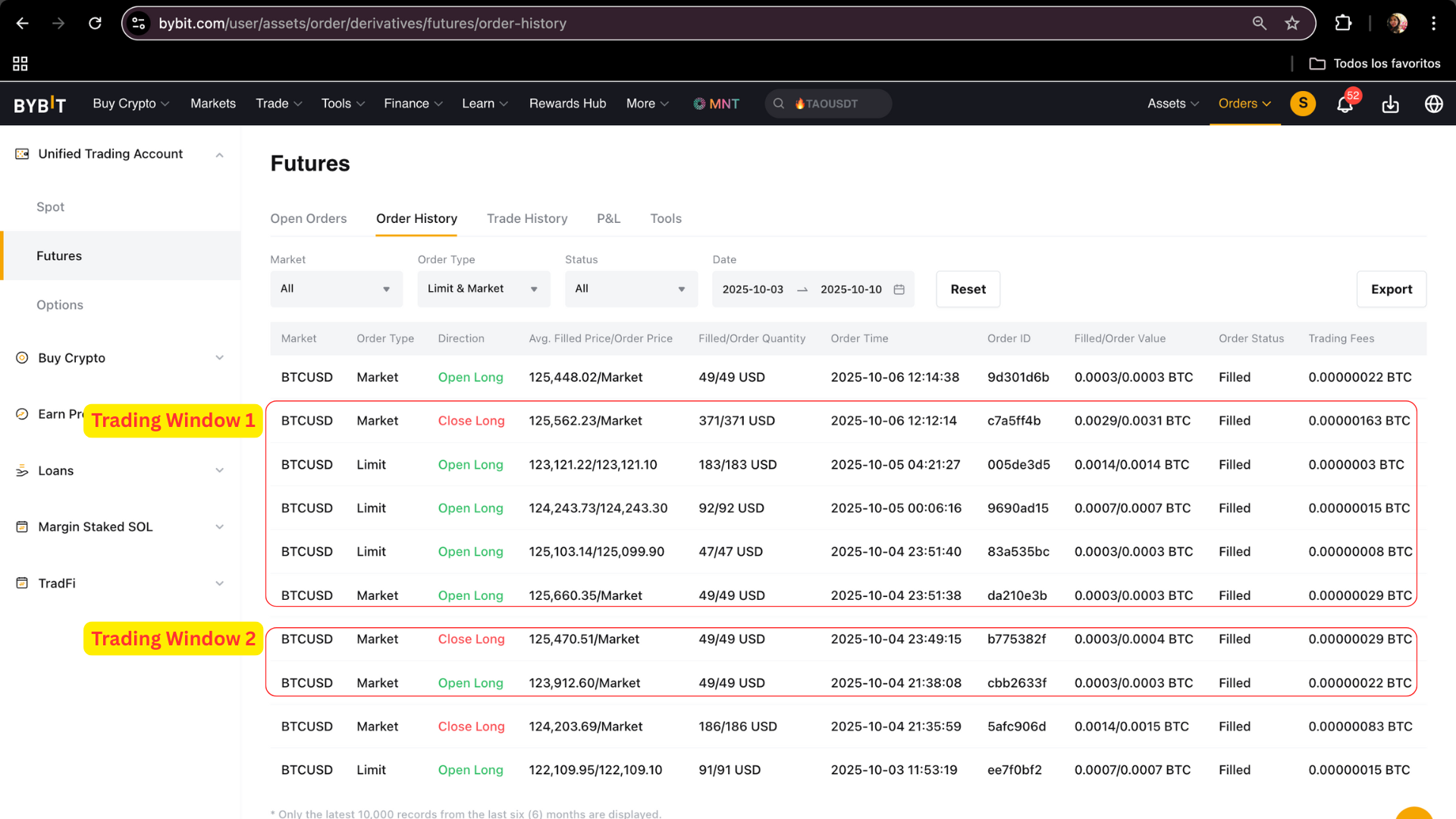
💡 How to check in Bybit:
Go to Orders → Unified Trading Order → Futures → Order History.
👉 https://www.bybit.com/user/assets/order/derivatives/futures/pl-history
A trading window spans from a buy order (green) — placed after a sell order (red) — to the next sell order (red), which closes the position.
All intermediate buy orders (green) between these two points form part of the same trade window.
Once the latest sell order (red) appears, the trade is considered closed — your margin + the profit are released back into your wallet and the system enters a 120-seconds cool-off period before a new trade is open. — A New trading window opens
You may safely make one withdrawal of up to 5% of your total balance between sell-to-sell periods
I’m trading on Spot, how can I know when a trading window has closed?
In Spot strategies, the bot accumulates (buys) and then sells only when the exit condition is met. That means the Active Orders list may be empty even while the trading window is still open.
The trading window is considered closed when:
A Sell has executed for the pair that the bot was accumulating (offsetting the last/s buy/DCA), and
Your funds are back in the quote asset (USDC or USDT), except for minimal dust.
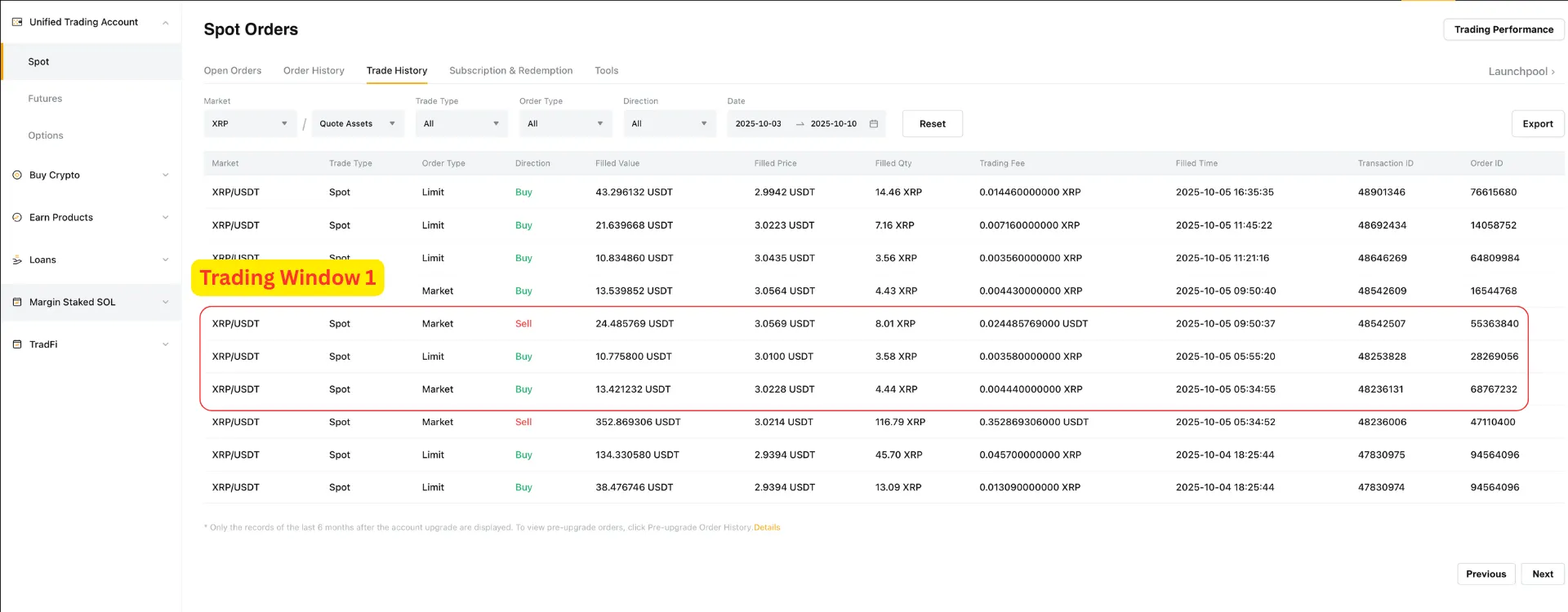
💡 How to check in Bybit:
Go to Assets → Spot and verify that the base coin balance ≈ 0 and value has returned to the quote asset (e.g., USDT).
Go to Orders → Unified Trading Order → Spot → Trade History.
👉 https://www.bybit.com/user/assets/order/fed/spot-uta-orders/trade-order/current-order
A trading window spans from a buy order (green) — placed after a sell order (red) — to the next sell order (red), which closes the position.
All intermediate buy orders (green) between these two points form part of the same trade window.
Once the latest sell order (red) appears, the trade is considered closed — your margin + the profit are released back into your wallet, and the system enters a brief pause before starting the next trade — A New trading window opens
You may safely make one withdrawal of up to 5% of your total balance between sell-to-sell periods
Need to withdraw funds ASAP?
Please contact: support@tradewithsequence.com before proceeding so our trading team can assess your live trade status and provide options accordingly.